Sentence Segmentation Survey for Java
Well, it’s time to get AtD working with more languages. A good first place to start is sentence segmentation. Sentence segmentation is the problem of taking a bunch of raw text and breaking it into sentences.
Like any researcher, I start my task with a search to see what others have done. Here is what I found:
- There is a standard out there called SRX for Segmentation Rules Exchange. SRX files are XML and there is an open source Segment Java library for segmenting sentences using these rule files. There is also an editor called Ratel that lets folks edit these SRX files. LanguageTool has support for SRX files.
- Another option is to use the OpenNLP project’s tools. They have a SentenceDetectorME class that might do the trick. The problem is models are only available for English, German, Spanish, and Thai.
- I also learned that Java 1.6 has built-in tools for sentence segmentation in the java.text.* package. These were donated by IBM. Here is a quick dump of the locales supported by this package:
java -jar sleep.jar -e 'println(join(", ", [java.text.BreakIterator getAvailableLocales]));'ja_JP, es_PE, en, ja_JP_JP, es_PA, sr_BA, mk, es_GT, ar_AE, no_NO, sq_AL, bg, ar_IQ, ar_YE, hu, pt_PT, el_CY, ar_QA, mk_MK, sv, de_CH, en_US, fi_FI, is, cs, en_MT, sl_SI, sk_SK, it, tr_TR, zh, th, ar_SA, no, en_GB, sr_CS, lt, ro, en_NZ, no_NO_NY, lt_LT, es_NI, nl, ga_IE, fr_BE, es_ES, ar_LB, ko, fr_CA, et_EE, ar_KW, sr_RS, es_US, es_MX, ar_SD, in_ID, ru, lv, es_UY, lv_LV, iw, pt_BR, ar_SY, hr, et, es_DO, fr_CH, hi_IN, es_VE, ar_BH, en_PH, ar_TN, fi, de_AT, es, nl_NL, es_EC, zh_TW, ar_JO, be, is_IS, es_CO, es_CR, es_CL, ar_EG, en_ZA, th_TH, el_GR, it_IT, ca, hu_HU, fr, en_IE, uk_UA, pl_PL, fr_LU, nl_BE, en_IN, ca_ES, ar_MA, es_BO, en_AU, sr, zh_SG, pt, uk, es_SV, ru_RU, ko_KR, vi, ar_DZ, vi_VN, sr_ME, sq, ar_LY, ar, zh_CN, be_BY, zh_HK, ja, iw_IL, bg_BG, in, mt_MT, es_PY, sl, fr_FR, cs_CZ, it_CH, ro_RO, es_PR, en_CA, de_DE, ga, de_LU, de, es_AR, sk, ms_MY, hr_HR, en_SG, da, mt, pl, ar_OM, tr, th_TH_TH, el, ms, sv_SE, da_DK, es_HN
A good survey of tools from the corpora-l mailing list is at http://mailman.uib.no/public/corpora/2007-October/005429.htm
I think I found my winner with Java’s built-in sentence segmentation tools. I haven’t evaluated the quality of the output yet (a task for tomorrow) but the fact it supports so many locales out of the box is very appealing to me. AtD-English has made it far on my simple rule-based sentence segmentation. If this API is near (or I suspect better than) what I have, this will do quite nicely.
Making the spell checker… more awesome.
I don’t talk much about the After the Deadline spell checker. Many people believe spell checking is a solved problem and they must “work the same way”. AtD does more than spell checking, so I talk about these other things.
Despite the lack of talk, AtD’s spell checker is awesome and I’m constantly improving it. That’s what I’m going to write about today. This past weekend I was writing a post and I tried to spell “conoisur”. As you call tell, I don’t know how to spell it and my attempt isn’t even close. It’s bad enough that I make spell checkers and can’t spell, it’s terrible that AtD couldn’t give me any suggestions. I felt left out in the cold.
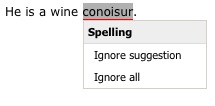
Suggestions before this post 🙂
Most spelling errors are one or two changes away from the intended word. AtD takes advantage of this and limits its suggestion search to words within two changes. By limiting the search space for words, AtD has less to choose from. This means AtD give you the right answer more often.
Peter Norvig conducted a quick experiment where he learned that 98.9% of the errors in the Birkbeck spelling error corpus were within two edits and 76% were one edit away. These numbers are close to what I found in my own experiments months ago. I’d present those numbers but I… lost them. *cough*
From these numbers, I felt it was safe to ignore words three or more edits away from the misspelling. This works well except when I try to spell words like connoisseur or bureaucracy. For my attempts, AtD generated no suggestions.
Then it hit me! If there are no suggestions within two edits… why don’t I try to find words within three edits. And if there are still no suggestions then, why I don’t I try words within four edits. I could go on like this forever. Unfortunately nothing is free and doing this would kill AtD’s performance. So I decided to limit my experiment to find words within three edits when no words are within two edits.
AtD’s spellchecker uses a neural network to score suggestions and compare them to each other. During training the neural network converges on an optimal weighting for each feature I give it. One of the features I give to the neural network is the edit distance normalized between 0.0 and 1.0. Edit distance is weighted highly as a value close to 1.0 is correct 76% of the time. I feared that introducing high edit distances that are almost always correct would create something that looks like a valley to the neural network. Meaning a high value is usually correct, a low value is usually correct, and the stuff in the middle is probably not so correct. Neural networks will make good guesses but they’re dependent on being told the story in the right way. This valley thing wasn’t going to work. So I modified the features so that an edit distance of 1 is a weight of 1.0 and everything else is 0.0.
Here are the numbers on AtD’s spell checker before I made these changes:
Word Pool Accuracy
| Data Set | Accuracy |
|---|---|
| sp_test_wpcm_nocontext.txt | 97.80% |
| sp_test_aspell_nocontext.txt | 79.06% |
Spelling Corrector Accuracy
| Data Set | Neural Network | Freq/Edit | Random |
|---|---|---|---|
| sp_test_gutenberg_context1.txt | 93.97% | 83.16% | 29.71% |
| sp_test_gutenberg_context2.txt | 77.14% | 59.68% | 19.68% |
The word pool accuracy is a measure of how often the pool of suggested words AtD generates has the intended word for a misspelled one in the test data. If the correct word is not here, AtD won’t be able to suggest it. The corrector accuracy is a measurement of how accurate AtD is at sorting the suggestion pool and putting the intended word on the top. The neural network score is what AtD uses in production and includes context. The joint frequency/edit distance score is similar to the statistical corrector in How to write a spelling corrector. Without context I don’t expect most spell checkers will do much better than that.
Here are the numbers with the changes:
Word Pool Accuracy
| Data Set | Accuracy |
|---|---|
| sp_test_wpcm_nocontext.txt | 98.19% +0.39% |
| sp_test_aspell_nocontext.txt | 82.58% +3.52% |
Spelling Corrector Accuracy
| Data Set | Neural Network | Freq/Edit | Random |
|---|---|---|---|
| sp_test_gutenberg_context1.txt | 94.51% +0.54% | 83.08% | 30.18% |
| sp_test_gutenberg_context2.txt | 79.38% +2.24% | 60.31% | 23.69% |
What this means for you
These little changes let AtD expand its search for suggestions when none were found. This means better recommendations for hard to spell words without impacting AtD’s stellar correction accuracy. I hope you enjoy it.
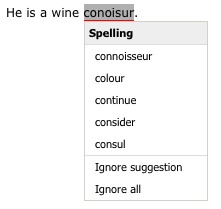
Suggestions you'll get now 🙂
How does this compare to MS Word, ASpell, and others?
If you want to compare these numbers with other systems, I presented numbers from similar data in another blog post. Be sure to multiply the spelling corrector accuracy with the word pool accuracy when comparing these numbers in the ones in the other post. For example: 0.9451 * 0.9891 = 0.9348 = 93.48%
If you’d like to play around with spelling correction and neural networks, consider downloading the After the Deadline source code. Everything you need to conduct your own experiments is included and it’s open source. The data sets used here are available in the bootstrap data distribution.
Comments Off on Making the spell checker… more awesome.
The Ten People You Meet at WordCamp NYC
Now that WordCamp NYC is over, it’s time to show some link love to those I met. Thanks for saying hi to the smiling guy in the velvet blazer.
- I watched Jake Goldman‘s demo on the Recommended Reading using Google Reader Sharing Plugin for WordPress. I like this plugin because it follows the philosophy of do one thing, do it well, and make it easy to use it in different ways. There are many possibilities to populate your blog with content from your Google Reader feed consumption process with this tool. Great work.
- I met Carl Valcarcel yesterday at the beginning of a session. He blogs about genetic algorithms, eclipse plugins, and code.
- I ran into Chris Masiello at a Starbucks. I was talking about this blog post in fact. He wowed me with a neat story. He started as a pre-school teacher in the projects, moved to working IT so he could afford to eat, and then transitioned to a career as a technical trainer. He now blogs about how to use different technologies that he is passionate about, including WordPress.
- Jeff Chandler of WP Tavern fame was a presence to reckon with. We met at a discussion about open source communities led by Paul Kim. He was very up on what is going on and had a lot of great insights.
- I helped WCNYC volunteer Kitty Bradshaw put After the Deadline on her blog. It’s really neat to see the passion and diverse interests in the WordPress community. If you’re interested in NYC life from a California girls perspective, you’ll need to check her blog out.
- I ran into the Mojofiti guys at the speakers party. They’re doing neat stuff. They’ve joined WordPress-MU, BuddyPress, and Google’s Translation API to create a community website where all the content is automatically translated to your language as you read it. They’re trying to help the sharing of ideas by breaking down language barriers. Bravo guys.
- Another one I met from the speakers party was Stephanie Cockerl who is a NYC based blog developer and consultant. Stephanie gave a talk on WordPress analytics.
- I had the pleasure of eating lunch with Cris Lombardi and Elizabeth Willse. A journalist and a connoisseur of blogs and beers makes for an interesting time. Cris has a great passion and respect for the military and what soldiers, airmen, seamen, and marines go through. I appreciate her taking the time to spread our stories.
- Keith Casey made a visit to the AtD API session. He’s CTO of a technology company and blogs about open source and technology leadership. I’m definitely going to give his stuff a deeper read when I get a chance.
- Christine Labate, the Design Director of Designs for Growth, gets points for best networker. I love watching people and how they interact. Every time I saw Christine she was engaged in deep conversation with someone new. This is great and it’s the total power of conferences. A technology conference is going to have the whole range of values on the introvert to extrovert scale. Someone like Christine helps seed the process by bouncing around from group to group getting folks to open up.
- Anne Jonas, an AmeriCorps volunteer with the Participatory Culture Foundation was also in attendance. I think it’s so cool AmeriCorps is involved with IT infrastructure, community development, and helping organizations becoming self-sustaining.
- Danilo Diaz, Developer Evangelist, from Microsoft was a strong presence at the WordCamp. He gave a great talk on Windows Live Writer. Microsoft is embracing cloud computing and I look forward to Office Web Apps. I’m told document fidelity is their first priority but I’d love to see their proofreading tools brought to the web too. If they raise the expectations in this space, I expect others will look for solutions to meet that demand and AtD will be there to help 🙂 Selfish? I don’t know–I just want to help people write better.
So that’s my wrap up of the folks I met at the conference. Well, ten 12 of them anyways. Who did you meet?
WordCamp NYC – AtD Wrap Up
So today is day two of WordCamp. This was my first one and I have to say it was definitely a good time. I learned a lot, got to interact with many WordPress “personalities”, and showed off AtD a bit.
I gave two presentations. At yesterday’s 2:30pm session I showed After the Deadline and its features to a packed room. To those of you who made it as far as this blog, good to see you, I hope you stick around.
I also gave a talk at 10pm showing how to add After the Deadline to a web application using jQuery. Those present seemed like a strong jQuery crowd so this was a positive thing. I hope some of you try it out. For those who couldn’t make it (but wanted to) here is the presentation:
As a side note: I just noticed AtD corrects wordcamp to WordCamp. I’m on the ball for you guys 🙂
Re: Writing Great Technical Documentation
Jacob Kaplan-Moss has a great series on his blog about writing technical documentation. You can imagine this is a topic near and dear to my heart. He starts his series discussing what to write, technical details of writing, and continues it with a post about needing an editor.
His advice is great, but despite this I feel proofreading software was wrongly omitted from the discussion. The ideas are sound but instructing readers to look to the Chicago Manual of Style for specifics isn’t helpful. This creates a high entry barrier for those who want to improve their writing.
On technical style Jacob talks about many good principles that are popular in Plain English. He says to write short paragraphs, keep a conversational tone, omit fluff, and watch out for the passive voice.
One commenter mentioned that beating up on passive voice and telling writers to omit fluff is useless advice on its own. From a blog post how is the reader supposed to know what is considered fluff?
For these problems there are software style checkers. A style checker is (usually) a rule-based tool that looks for phrases editors get nit-picky about. It’s not the same as having a human editor but checking your writing against thousands of common pitfalls doesn’t hurt. In the UNIX world we’ve had GNU Style and Diction for many years. You can also use After the Deadline. For omitting fluff it finds complex expressions, redundant phrases, and clichés. For most things it flags it offers a usable alternative. For example, used is suggested for utilized.
There is nothing wrong with passive voice on its own. Use passive voice to downplay the actor who performed the action. The danger with passive voice is overusing it. Again, a style checking tool can flag your passive voice. If you see it in every sentence, you have a problem. If it’s a rare occurrence, no big deal.
The last post in the series talks about the need for an editor. Jacob’s first tip: don’t edit without permission. I have mixed feelings on this. I get edits in my email with a respectful tone, this is fine. And then I get those with a smug twist and that bothers me. The key is to be respectful. If you want to invite edits to your blog, consider a tool like GooseGrade. It’s a widget that invites your readers to notify you of typos and their relevant correction. GooseGrade has an interface that lets you accept these changes into your post with the push of a button.
I like Jacob’s tips about printing your document and editing it with a red pen. I do this when I’m editing an article and feel the extra attention to detail is worth the time. I also recommend reading backwards through the document. That helps me.
Jacob has a few typos in his third post. ‘You’ll be less likely to “know” that you got something write,’ is called out in the first comment. When I am tired, I mix up write and right. I do this all the time. We can’t expect a human editor for everything we write, but a mechanical check is always possible.
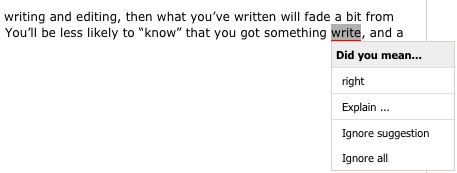
Spell checkers have a bad rap because most only flag an error if what you wrote happens to be missing from the dictionary. Fortunately these tools are evolving. The newest ones look at context and use statistics to detect misused words like right and write. After the Deadline has this feature.
The principles Jake discusses are good to know and readers will benefit. For the low-level details of some of these, there are software tools that can help you. As you’re writing documentation, I urge you to find a tool that works for you and add it to your process.
After the Deadline is an open source proofreading tool that checks spelling, style, and grammar. If you’re a developer you can embed it into your application. Plugins for jQuery and TinyMCE are available. You can try After the Deadline at http://www.polishmywriting.com
Add After the Deadline to Your Application
1. Why After the Deadline
Welcome to Raffi’s practical guide to adding After the Deadline to your application. After the Deadline is a technology that checks spelling, style, and grammar. Through it you can bring word processor quality writing tools to the users of your application. And it’s open source. How much better can it get?
2. Server Software
After the Deadline uses a client-server architecture. Your program embeds code that talks to an After the Deadline server. When the user clicks the spellcheck button their document is sent to a server, processed, and the errors are sent back. This code in your application then proceeds to highlight these errors and present them to the user.

To add After the Deadline to your application you will need to run an After the Deadline server. You can download the code for the server from:
http://open.afterthedeadline.com/download/download-source-code/
You only need the source code package and don’t worry–precompiled binaries are distributed in the package.
To run After the Deadline you’ll need Java 1.6.0 and 4GB of memory. You can put it on a virtual machine so long as it has enough memory. After the Deadline will happily use as many CPU cores as you can give it. If you’re not processing a lot of requests you’ll only need a single core. We run our After the Deadline server on an eight core machine but we have a lot of users, your needs may vary.
The memory requirements are steep but this is because After the Deadline loads its language models into memory. After the Deadline uses these models to make smart spelling corrections, decide if a word is misused, and to avoid bogus grammar and style errors.
Installation of After the Deadline is pretty easy. Extract the archive where ever you like and execute ./run.sh to start the server. We’ve run the After the Deadline server on Linux and MacOS X

After the Deadline will listen on port 1049 of your localhost. For security reasons it only accepts connections from 127.0.0.1. We use nginx to proxy connections from port 80 to 127.0.0.1:1049. You can do this or if you’re feeling adventurous you can edit run.sh and change -Dbind.interface=127.0.0.1 to reflect the external IP address of your server.
Regardless of which choice you make, you’ll want to take note of the IP address and port number of your After the Deadline server. We will use this information later.
3. Talking to the Server
As a security measure, JavaScript uses a same origin policy for AJAX calls. JavaScript executed on a webpage can only send requests to the server the script was downloaded from. It’s quite understandable that you’ll want to run After the Deadline on hardware that is separate from your web server. This poses a problem as this policy prevents any front-end integration from talking to your After the Deadline server.
The solution to this problem is to create a proxy script on your webserver that receives AJAX calls and sends them to your After the Deadline server. In our TinyMCE and jQuery packages we include this proxy.php file that you can modify to your needs.
$API_KEY = "";

if ( $_SERVER['REQUEST_METHOD'] === 'POST' )
{
 $postText = trim(file_get_contents('php://input'));
}

if (strcmp($API_KEY, "") != 0)
{
 $postText .= '&key=' . $API_KEY;
}

$url = $_GET['url'];

/* this function directly from akismet.php by Matt Mullenweg.  *props* */
function AtD_http_post($request, $host, $path, $port = 80)
{
 $http_request  = "POST $path HTTP/1.0\r\n";
 $http_request .= "Host: $host\r\n";
 $http_request .= "Content-Type: application/x-www-form-urlencoded\r\n";
 $http_request .= "Content-Length: " . strlen($request) . "\r\n";
 $http_request .= "User-Agent: AtD/0.1\r\n";
 $http_request .= "\r\n";
 $http_request .= $request;

 $response = '';
 if( false != ( $fs = @fsockopen($host, $port, $errno, $errstr, 10) ) )
 {
   fwrite($fs, $http_request);

   while ( !feof($fs) )
   {
     $response .= fgets($fs);
   }
   fclose($fs);
   $response = explode("\r\n\r\n", $response, 2);
 }
 return $response;
}

$data = AtD_http_post($postText, "service.afterthedeadline.com", $url);

header("Content-Type: text/xml");
echo $data[1];
?>
To adapt this script, change service.afterthedeadline.com in line 42 to the address of your server. I don’t recommend hardcoding an API key as the After the Deadline server caches information about your writing and uses the key to lock this data structure. If every request uses the same key, you will unnecessarily bottleneck those requests.
If your After the Deadline server receives requests on a port other than port 80, you may append this port to the AtD_http_post function after $url:
$data = AtD_http_post($postText, "192.168.1.101", $url, 1049);
If you don’t use PHP on your server then you will need to create your own AJAX proxy script. This is a common problem and several solutions are available for most languages.
Now that you have a proxy script, note this URL as we will use it when we integrate After the Deadline with your application’s front-end.
4. Front-End Integration
Now that you have a server and a means to communicate with it, the last step is to integrate After the Deadline into the front-end of your web application. Several options are available at http://www.afterthedeadline.com/development.slp. Here I will focus on the After the Deadline extension for jQuery. jQuery is a JavaScript library that removes the pain of working with multiple browsers.
Download the After the Deadline package for jQuery and extract it on your webserver. You can get it from: http://www.afterthedeadline.com/download.slp?platform=jQuery
Adding After the Deadline to an application involves:
- loading the right resources
- creating your form
- telling the After the Deadline jQuery package where to find your proxy script
- creating functions to check the right form element and restore the form before submitting.
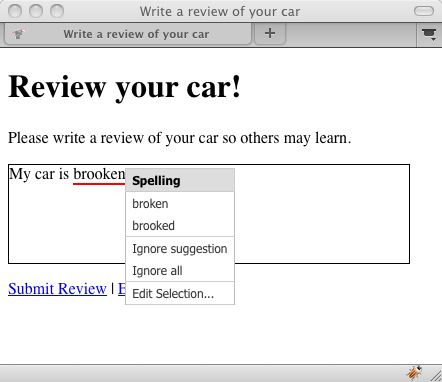
Our example application is a car review website. Ok, it’s not much of an application but it illustrates these steps. It contains a TEXTAREA where the user is expected to write their review. It also has a Check Spelling link that the user can click to check their writing.
Here is a screenshot of this application in action:
Here is the code to the application:
<html>
 <head>
 <title>Write a review of your car</title>

 <script src="http://ajax.googleapis.com/ajax/libs/jquery/1.3/jquery.min.js"></script>
 <script src="scripts/jquery.atd.js"></script>
 <script src="scripts/csshttprequest.js"></script>
 <link rel="stylesheet" type="text/css" media="screen" href="css/atd.css" />
 <script src="scripts/jquery.atd.textarea.js"></script>

 <script>
 function check()
 {
    AtD.checkTextArea('review', 'checkLink', 'Edit Text');
 }

 function submit()
 {
    AtD.restoreTextArea('review');
    jQuery('#reviewForm').submit();
 }

 AtD.rpc = 'server/proxy.php?url=';
 AtD.api_key = ( new Date() ).getMinutes();
 </script>

 </head>
 <body>

 <h1>Review your car!</h1>

 <p>Please write a review of your car so others may learn.</p>

 <form id="reviewForm">
   <textarea id="review" name="review" class="input" style="width: 400px; height: 100px; border: 1px solid black"></textarea>
   <p><a href="javascript:submit()">Submit Review</a> | <a href="javascript:check()" id="checkLink">Check Spelling</a></p>
 </form>
 </body>
</html>
Lines 7-9 load the After the Deadline resources. You can change the look of the After the Deadline markup by modifying css/atd.css. Line 5 loads jQuery. You want to make sure you do this first.
Lines 34-37 contain the car review form. Line 35 has the TEXTAREA. Note that the value of its id is review. I have also embedded some style information into the TEXTAREA element. When you click the check spelling button, the After the Deadline jQuery extension will do its best to mimic the look of the original TEXTAREA. You can put this information inline or assign a class to the TEXTAREA. If you want the spellchecker mode to pick up the style information, make sure it works with a DIV as well as a TEXTAREA.
Lines 23 and 24 tell the After the Deadline jQuery extension where to find your proxy script. You’ll notice I set the key to a random value. I did this because you’re using your own server. Despite this, the After the Deadline jQuery extension expects an API key when talking to a proxy script.
In line 36 you’ll notice that Submit Link is set to call the JavaScript submit function. This function is defined on lines 17-21. In line 19 I call a function to restore your TEXTAREA before submitting the form. This is important as After the Deadline replaces the TEXTAREA with a DIV during proofreading. This function does nothing if the TEXTAREA doesn’t need to be restored.
Line 36 also has a Check Spelling link that calls a JavaScript check function. This function is defined on lines 12-15. On line 14 I call an After the Deadline jQuery extension function to check the TEXTAREA. The first parameter is the id of the TEXTAREA. The second parameter is the id of the check spelling link. Within this link you can use any HTML you like. The third parameter is what the link should say when After the Deadline is checking the TEXTAREA. This is a good place to tell the user that their text is not editable.
You can try this example at http://www.polishmywriting.com/atd_jquery/carreview.html.
5. Can I use After the Deadline with my application?
The After the Deadline server software is released under the GNU General Public License (GPL). You’re welcome to use and redistribute this server software even for commercial purposes. If you choose to redistribute the After the Deadline server with your changes then you must make the source code with your changes available under the GNU General Public License. This only applies to the After the Deadline server software. Since this software is a stand-alone server, the requirements of the GPL shouldn’t burden you too much.
The client side libraries like the jQuery extension are available under the GNU Lesser General Public License. This license grants you the same freedoms as the GPL while including an exception that states only changes to the library need to be redistributed with source code. You’re able to use these libraries in your closed source application.
6. The Next Step
Now you know how to add After the Deadline to your application. It’s a simple matter of installing the server, creating a proxy, and integrating with your front-end.
If you have questions, you’re encouraged to ask them on the atd-developers mailing list.
Updates to AtD/TinyMCE and AtD/jQuery
Today I released updates to the AtD/TinyMCE and AtD/jQuery plugins. Here is the latest:
AtD/jQuery
This release adds functions for easily hooking into a TEXTAREA. I observed a few people and how they adopted the examples and decided to help them out. There are also several bug fixes and support for diacritical marks.
- AtD/jQuery plugin page – download the latest
- AtD/jQuery Changelog – see what’s new
AtD/TinyMCE
Surprise 🙂 This update fixes several bugs and adds support for diacritical marks.
- AtD/TinyMCE plugin page – download the latest
- AtD/jQuery Changelog – see what’s new
Accent your writing with AtD
Diacritical marks are those accents and marks we leave out when we’re writing words like resumé, naïve, and San José. This is common practice because most of us don’t know or can’t remember the codes to produce these marks.
For proper nouns like São Paulo, a city in Brazil, it’s critical to have these marks as they are part of the proper spelling of the place.
For other words the marks are optional. I can write cafe and you’ll know what I mean. But what about resume? Am I referring to continuing an action or a document that I gladly deleted when I joined Automattic? Ok, you can pick up the meaning on context. Let’s agree that resumé is prettier than resume.
In the interest of correct and pretty writing, After the Deadline now helps you restore diacritical marks in your writing. This is a style checker option that you enable through your WordPress profile.
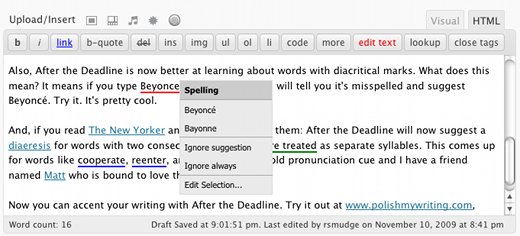
Also, After the Deadline is now better at learning words with diacritical marks. What does this mean? It means if you type Beyonce, After the Deadline will tell you it’s misspelled and suggest Beyoncé. Try it. It’s pretty cool.
And, if you read The New Yorker and want to write like them: After the Deadline will now suggest a diaeresis for words with two consecutive vowels that are treated as separate syllables. This comes up for words like coöperate, reënter, and zoölogy. It’s an old pronunciation cue and I have a friend named Matt who is bound to love this feature.
Now you can accent your writing with After the Deadline. Try it out at www.polishmywriting.com, download the plugin at wordpress.org, or add it to your application through our developer support.
Update Extravaganza: TinyMCE, jQuery, and WordPress Plugins
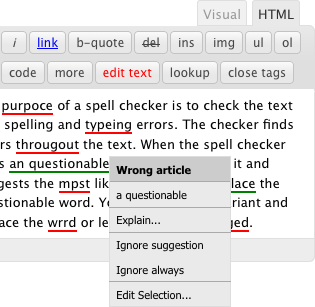
One of the most requested features for the After the Deadline WordPress plugin has been support for the HTML Editor. I’m pleased to announce this feature is now available. Visit the WordPress plugin repository to download the update.
AtD/jQuery
The AtD/WP plugin builds on the AtD/jQuery plugin. So today I’m also announcing an update to the AtD/jQuery package as well. The AtD/jQuery plugin now supports all the features of After the Deadline. As the developer you get to pick and choose what to use.
- AtD/jQuery plugin page – download the latest
- AtD/jQuery Changelog – see what’s new
AtD/TinyMCE
The AtD/jQuery and AtD/TinyMCE code have a lot in common. A bug in one usually means I get to make the same bug fix in another. With that in mind, the AtD/TinyMCE code has been updated with several fixes. This updated plugin also includes new documentation and a demo for you to work with.
- AtD/TinyMCE plugin page – download the latest
- AtD/jQuery Changelog – see what’s new
AtD now for bbPress – Thanks!
Thanks to the efforts of Gautam Gupta, After the Deadline is now available for bbPress. bbPress is the WordPress take on forum software. Simple, elegant, and usable.
This plugin lets users check the spelling and grammar of their posts before they go live. How cool is that? (Ok, everything around here is about checking spelling and grammar–it’s still cool)
You can find out more on Gautam’s blog or download the After the Deadline plugin from the bbPress plugin repository.
Here is a screenshot of AtD/bbPress in action:
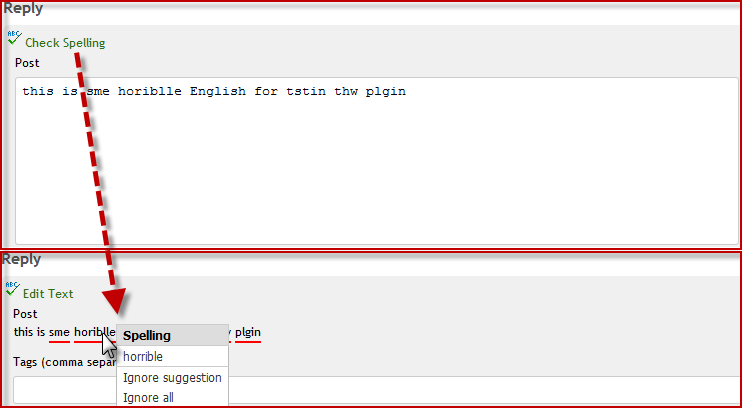
AtD/bbPress uses the AtD/jQuery library. You can download AtD/jQuery and other developer goodies from the AtD developer’s page. If you add AtD to an application, let me know.
 After the Deadline
Comments Off on Sentence Segmentation Survey for Java