WordCamp NYC Ignite: After the Deadline
I see that the After the Deadline demonstration for WordCamp NYC has been posted. This short five-minute demonstration covers the plugin and its features.
Before you watch this video, can you find the error in each of these text snippets?
There is a part of me that believes that if I think about these issues, if I put myself through the emotional ringer, I somehow develop an immunity for my own family. Does writing a book about bullying protect your children from being bullied? No. I realize that this kind of thinking is completely ridiculous.’’
[Op-Ed] … Roberts marshaled a crusader’s zeal in his efforts to role back the civil rights gains of the 1960s and ’70s — everything from voting rights to women’s rights.
The success of Hong Kong residents in halting the internal security legislation in 2004, however, had an indirect affect on allowing the vigil here to grow to the huge size it was this year.
These examples come from the After Deadline blog, When Spell-Check Can’t Help. You can watch the video to learn how After the Deadline can help and what the errors are. You can also try these out at http://www.polishmywriting.com.
You can also view the WCNYC session on how embed After the Deadline into an application.
George Orwell and After the Deadline
Ok, I have to admit something. George Orwell does not use After the Deadline. But, if he were alive now, I bet he would.
In his essay, Politics and the English Language, George Orwell defines the following rules for clear writing:
- Never use a metaphor, simile, or other figure of speech which you are used to seeing in print.
- Never use a long word where a short one will do.
- If it is possible to cut a word out, always cut it out.
- Never use the passive where you can use the active.
- Never use a foreign phrase, a scientific word, or a jargon word if you can think of an everyday English equivalent.
- Break any of these rules sooner than say anything outright barbarous.
Did you know After the Deadline can help you with these rules? Here is how:
Rule 1: Avoid clichés
You should avoid clichés in your writing. After the Deadline flags over 650 worn out phrases. These phrases lose their power because we’re so used to seeing them.
Rule 2: Use Simple Words
After the Deadline helps you replace complex expressions with simple everyday words. Examples include use instead of utilize, set up over establish, and equal over equivalent.
Rule 3: Avoid Redundant Expressions
A common poor writing habit is using phrases with extra words that add nothing to the meaning. After the Deadline flags these so you can remove them. Examples include destroy over totally destroy, now instead of right now, and written over written down.
Rule 4: Avoid Passive Voice
Like a good copy editor, After the Deadline uses its virtual pen to find passive voice and bring it to your attention. It’s up to you if you want to revise it or not. In most cases you will make your writing much clearer.
Rule 5: Avoid Jargon
This is a hard one as each field has its own jargon. After the Deadline flags some foreign phrases and jargon words. It’s up to you to try to find the right words depending on your audience.
Rule 6: Remember, rules are meant to be broken
Rules are great but they do not cover every situation. To help, After the Deadline uses a statistical language model to filter poor suggestions.
This is a repost from the old-AtD blog. If this topic interests you visit http://www.afterthedeadline.com where you can download After the Deadline for WordPress or learn how to add it to an application.
WordPress Plugin Update
The AtD/WP.org plugin experienced some reworking this week. This release smooths the install process, adds a new feature, and fixes several bugs. Here are the highlights:
Auto-Proofread on Publish and Update
Many of you have told me “I love AtD but I keep forgetting to run it before I post”. Well, never fear. Mohammad Jangda and I have worked together to bring a new toy to you. AtD now has an auto-proofread on publish and update feature. You can enable it from your user profile page.

When enabled, this feature will run AtD against your post (or page) before a publish or update. If any errors are found, you’ll be prompted with a dialog:
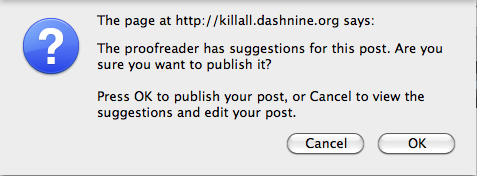
It is then up to you. If you want to publish, click OK. Otherwise click Cancel to interact with the errors and make your changes. The next time you hit Publish your post will go through.
Define a Global AtD Key for WPMU Users
If you’re using WPMU and would like a way to set a global AtD key, we’ve got you covered. AtD now looks for an ATD_KEY constant before prompting for a key. If this constant exists, the ask for a key page goes away. You can also define ATD_SERVER and ATD_PORT if you’re running your own AtD server from our open source distribution. You can set these constants in wp-config.php.
Smoother Installation Process
For most of you, installing After the Deadline is a snap. For some of you, it doesn’t work out. It seems there are two issues that pop up and this update addresses them.
The first snag is many folks try to use their WordPress.com API key instead of their After the Deadline API key. Fortunately these have different forms and are easy to tell apart. The plugin now detects when you entered something other than an After the Deadline API key and gently notifies the user that an After the Deadline API key is different.
The second snag has to do with security. Many system administrators lock down a PHP installation by disabling functions that PHP scripts use to connect to other hosts on the internet. AtD connects to a service to do its job. AtD now detects this security measure and tells the user to contact their system administrator (along with what needs to be fixed).
This should help many of you out. As always, enjoy the update.
As a side note: the AtD/jQuery and AtD/TinyMCE extensions were both updated as well. These are minor fixes but you should get them if you’re using them in your app.
After the Deadline @ Washington, DC PHP Meeting
Last night I had the priviledge to present After the Deadline to the Washington DC PHP Meeting. Definitely one of the best audiences I’ve experienced. Thanks guys.
In this talk I demoed After the Deadline, talked about some of the NLP and AI technology under the hood, and showed how to embed AtD into an application using jQuery and TinyMCE.
Shaun Farrell was technically savvy enough to record it (I tried but my attempt failed). You can see the video here:
And the slides from the presentation are here:
If you’re looking at all this and thinking: “wow, this After the Deadline stuff is fun. I want to attend an After the Deadline live seminar in my area” then you’ve come to the right place. I’m demoing After the Deadline tonight at the Washington DC Technology Meetup in Ellicot City, MD and next week I’m giving a similar talk at the Baltimore PHP Meetup.
I’m tracking AtD related events on the Events page of this blog. If you’d like a speaker for your event, I’m glad to take this show on the road in the mid-atlantic region. Feel free to contact me raffi at automattic dot com.
Comments Off on After the Deadline @ Washington, DC PHP Meeting
Thoughts on a tiny contextual spell checker
Spell checkers have a bad rap because they give poor suggestions, don’t catch real word errors, and usually have out of date dictionaries. With After the Deadline I’ve made progress on these three problems. The poor suggestions problem is solved by looking at context as AtD’s contextual spell checker does. AtD again uses context to help detect real word errors. It’s not flawless but it’s not bad either. AtD has also made progress on the dictionary front by querying multiple data sources (e.g., Wikipedia) to find missing words.
Problem Statement
So despite this greatness, contextual spell checking isn’t very common. I believe this is because contextual spell checking requires a language model. Language models keep track of every sequence of two words seen in a large corpus of text. From this data the spell checker can calculate P(currentWord|previousWord) and P(currentWord|nextWord). For a client side application, this information amounts to a lot of memory or disk space.
Is it possible to deliver the benefits of a contextual spell checker in a smaller package?
Why would someone want to do this? If this could be done, then it’d be possible to embed the tiny contextual spell checker into programs like Firefox, OpenOffice, and others. Spell check as you type would be easy and responsive as the client could download the library and execute everything client side.
Proposed Solution
I believe it’s possible to reduce the accuracy of the language model without greatly impacting its benefits. Context makes a difference when spell checking (because it’s extra information), but I think the mere idea that “this word occurs in this context a lot more than this other one” is enough information to help the spell checker. Usually the spell checker is making a choice between 3-6 words anyways.
One way to store low fidelity language model information is to associate each word with some number of bloom filters. Each bloom filter would represent a band of probabilities. For example a word could have three bloom filters associated with it to keep track of words occurring in the top-25%, middle-50%, and bottom-25%. This means the data size for the spell checker will be N*|dictionary| but this is better than having a language model that trends towards a size of |dictionary|^2.
A bloom filter is a data structure for tracking whether something belongs to a set or not. They’re very small and the trade-off is they may give false positives but they won’t give false negatives. It’s also easy to calculate the false positive rate in a bloom filter given the number of set entries expected, the bloom filter size, and the number of hash functions used. To optimize for space, the size of the bloom filter for each band and word could be determined from the language model.
If this technique works for spelling, could it also work for misused word detection? Imagine tracking trigrams (sequences of three words) for each potentially misused word using a bloom filter.
After looking further into this, it looks like others have attacked the problem of using bloom filters to represent a language model. This makes the approach even more interesting now.
Comments Off on Thoughts on a tiny contextual spell checker
Generating a Plain Text Corpus from Wikipedia
AtD *thrives* on data and one of the best places for a variety of data is Wikipedia. This post describes how to generate a plain text corpus from a complete Wikipedia dump. This process is a modification of Extracting Text from Wikipedia by Evan Jones.
Evan’s post shows how to extract the top articles from the English Wikipedia and make a plain text file. Here I’ll show how to extract all articles from a Wikipedia dump with two helpful constraints. Each step should:
- finish before I’m old enough to collect social security
- tolerate errors and run to completion without my intervention
Today, we’re going to do the French Wikipedia. I’m working on multi-lingual AtD and French seems like a fun language to go with. Our systems guy, Stephane speaks French. That’s as good of a reason as any.
Step 1: Download the Wikipedia Extractors Toolkit
Evan made available a bunch of code for extracting plaintext from Wikipedia. To meet the two goals above I made some modifications*. So the first thing you’ll want to do is download this toolkit and extract it somewhere:
wget http://www.polishmywriting.com/download/wikipedia2text_rsm_mods.tgz
tar zxvf wikipedia2text_rsm_mods.tgz
cd wikipedia2text
(* see the CHANGES file to learn what modifications were made)
Step 2: Download and Extract the Wikipedia Data Dump
You can do this from http://download.wikimedia.org/. The archive you’ll want for any language is *-pages-articles.xml.bz2. Here is what I did:
wget http://download.wikimedia.org/frwiki/20091129/frwiki-20091129-pages-articles.xml.bz2
bunzip2 frwiki-20091129-pages-articles.xml.bz2
Step 3: Extract Article Data from the Wikipedia Data
Now you have a big XML file full of all the Wikipedia articles. Congratulations. The next step is to extract the articles and strip all the other stuff.
Create a directory for your output and run xmldump2files.py against the .XML file you obtained in the last step:
mkdir out
./xmldump2files.py frwiki-20091129-pages-articles.xml out
This step will take a few hours depending on your hardware.
Step 4: Parse the Article Wiki Markup into XML
The next step is to take the extracted articles and parse the Wikimedia markup into an XML form that we can later recover the plain text from.There is a shell script to generate XML files for all the files in our out directory. If you have a multi-core machine, I don’t recommend running it. I prefer using a shell script for each core that executes the Wikimedia to XML command on part of the file set (aka poor man’s concurrent programming).
To generate these shell scripts:
find out -type f | grep '\.txt$' >fr.files
To split this fr.files into several .sh files.
java -jar sleep.jar into8.sl fr.files
You may find it helpful to create a launch.sh file to launch the shell scripts created by into8.sl.
cat >launch.sh
./files0.sh &
./files1.sh &
./files2.sh &
...
./files15.sh &
^D
Next, launch these shell scripts.
./launch.sh
Unfortunately this journey is filled with peril. The command run by these scripts for each file has the following comment: Converts Wikipedia articles in wiki format into an XML format. It might segfault or go into an “infinite” loop sometimes. This statement is true. The PHP processes will freeze or crash. My first time through this process I had to manually watching top and kill errant processes. This makes the process take longer than it should and it’s time-consuming. To help I’ve written a script that kills any php process that has run for more than two minutes. To launch it:
java -jar sleep.jar watchthem.sl
Just let this program run and it will do its job. Expect this step to take twelve or more hours depending on your hardware.
Step 5: Extract Plain Text from the Articles
Next we want to extract the article plaintext from the XML files. To do this:
./wikiextract.py out french_plaintext.txt
This command will create a file called french_plaintext.txt with the entire plain text content of the French Wikipedia. Expect this command to take a few hours depending on your hardware.
Step 6 (OPTIONAL): Split Plain Text into Multiple Files for Easier Processing
If you plan to use this data in AtD, you may want to split it up into several files so AtD can parse through it in pieces. I’ve included a script to do this:
mkdir corpus
java -jar sleep.jar makecorpus.sl french_plaintext.txt corpus
And that’s it. You now have a language corpus extracted from Wikipedia.
Progress on the Multi-Lingual Front
I’m making progress on multi-lingual AtD. I’ve integrated LanguageTool into AtD. LanguageTool is a language checking tool with support for 18 languages. Creating grammar rules is a human intensive process and I’d prefer to go with an established project with a successful community process.
I’m also working on creating corpus data from Wikipedia. I have a pipeline of four steps. The longest step for each language takes 12+ hours to run and ties up my entire development server. So I’m limited to generating data for one language each night.
With this corpus data I have the ability to provide contextual spell checking for that language and crude statistical filtering for the LanguageTool results (assuming LT supports that language).
Here are some stats to motivate this:
66% of the blogs on WordPress.com are English. This limits the utility of AtD to 66% of our userbase. By supporting the next six languages with AtD, we can provide proofreading tools to nearly 90% of the WordPress.com community. That’s pretty exciting.
Right now this work is in the proof of concept stage. I expect to have a French AtD (spell checking + LanguageTool grammar checking) soon. I’ll have some folks try it and tell me what their experience is. If you want to volunteer to try this out, contact me.
Comments Off on Progress on the Multi-Lingual Front
AtD on WordPress Weekly Podcast
Last night I was interviewed by Jeff at the WordPress weekly podcast. If you listen, you’ll learn:
- What life is like at Automattic
- How AtD works
- Who a hit was ordered on and why
Comments Off on AtD on WordPress Weekly Podcast
Learning from your mistakes — Some ideas
I’m often asked if AtD gets smarter the more it’s used. The answer is not yet. To stimulate the imagination and give an idea of what’s coming, this post presents some ideas about how AtD can learn the more you use it.
There are two immediate sources I can harvest: the text you send and the phrases you ignore.
Learning from Submitted Text
The text you send is an opportunity for AtD to learn from the exact type of writing that is being checked. The process would consist of saving parts of submitted documents that pass some correctness filter and retrieving these for use in the AtD language model later.
Submitted documents can be added directly to the AtD training corpus which will impact almost all features positively. AtD uses statistical information from the training data to find the best spelling suggestions, detect misused words, and find exceptions to the style and grammar rules.
More data will let me create a spell checker dictionary with less misspelled or irrelevant words. A larger training corpus means more words to derive a spell checker dictionary from. AtD’s spell check requires a word is seen a certain number of times before it’s included in the spell checker dictionary. With enough automatically obtained data, AtD can find the highest threshold that will result in a dictionary about 120K words.
Learning from Ignored Phrases
When you click “Ignore Always”, this preference is saved to a database. I have access to this information for the WordPress.com users and went through it once to see what I could learn.
This information could be used to find new words to add to AtD. Any word that is ignored by multiple people may be a correct spelling that the AtD dictionary is missing. I can set a threshold of how many times a word must be ignored before it’s added to the AtD word lists. This is a tough problem though as I don’t want commonly ignored errors like ‘alot’ finding their way into the AtD dictionary, some protection against this is necessary.
Misused words that are flagged as ignored represent an opportunity to focus data collection efforts on that word. This is tougher but I may be able to query a service like wordnik to get more context on the word and add the extra context to the AtD corpus. If a word passes a threshold of being ignored by a lot of people, it may also be a good idea to consider removing it from the misused word list automatically. The statistical detection approach doesn’t work well with some words.
Aiming Higher
These ideas represent some of the low hanging fruit to make AtD learn as you use the service. Let’s imagine I could make AtD could track any behavior and the context around it. There are good learning opportunities when you accept a suggestion and the misused word feature has more opportunity to improve if context is attached to your accepting or ignoring a suggestion.
These are my thoughts, what are yours?
Text Segmentation Follow Up
My first goal with making AtD multi-lingual is to get the spell checker going. Yesterday I found what looks like a promising solution for splitting text into sentences and words. This is an important step as AtD uses a statistical approach for spell checking.
Here is the Sleep code I used to test out the Java sentence and word segmentation technology:
$handle = openf(@ARGV[1]);
$text = join(" ", readAll($handle));
closef($handle);

import java.text.*;

$locale = [new Locale: @ARGV[0]];
$bi = [BreakIterator getSentenceInstance: $locale];

assert $bi !is $null : "Language fail: $locale";

[$bi setText: $text];

$index = 0;

while ([$bi next] != [BreakIterator DONE])
{
   $sentence = substr($text, $index, [$bi current]);
   println($sentence);

   # print out individual words.
   $wi = [BreakIterator getWordInstance: $locale];
   [$wi setText: $sentence];

   $ind = 0;

   while ([$wi next] != [BreakIterator DONE])
   {
      println("\t" . substr($sentence, $ind, [$wi current]));
      $ind = [$wi current];
   }

   $index = [$bi current];
}
You can run this with: java -jar sleep.jar segment.sl [locale name] [text file]. I tried it against English, Japanese, Hebrew, and Swedish. I found the Java text segmentation isn’t smart about abbreviations which is a shame. I had friends look at some trivial Hebrew and Swedish output and they said it looked good.
This is a key piece to being able to bring AtD spell and misused word checking to another language.
Comments Off on Text Segmentation Follow Up
 After the Deadline
1 comment