After the Deadline for Comments – So Many Ways, So Much Fun
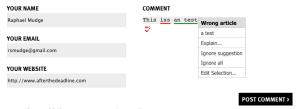
There’s another way to make After the Deadline available on your blog. Now you can use it with comments thanks to the After the Deadline for Comments plugin by Otto42. You can see it in action on the world-famous ma.tt blog. If you have feedback on this plugin, there is a thread on the WPTavern.com forum.
Here is a screenshot:
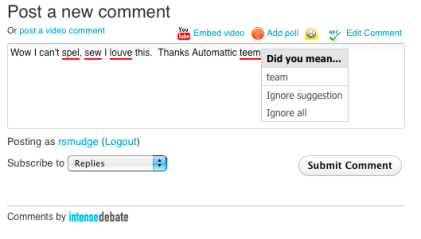
If you’re an IntenseDebate user, don’t forget that After the Deadline is available as an IntenseDebate plugin too. It works pretty seamlessly as well.
Finally, the commercial (but GPL) AJAX Edit Comments plugin integrates After the Deadline too.

Credit: ajaxeditcomments.com
So, if you’re looking for spelling and grammar checking for your blog comments, After the Deadline can help. If you just want this checking capability for yourself, we offer plugins for Google Chrome and Firefox as well.
After the Deadline for Google Chrome 1.2
After the Deadline for Google Chrome 1.2 is now available. This release fixes several bugs and adds a few options. Specifically:
- The auto-proofread feature is disabled by default. Some sites use JavaScript to prevent double submissions of an HTML form. The auto-proofread feature conflicts with these checks. If you want it, turn it on and use the disable on this site feature for the occasional troublesome site.
- This release fixes issues that were affecting Google Spreadsheet, Blogger, and GMail users.
- The “no writing mistakes were found” dialog is now optional. Go to the AtD options page to disable it.
To update to the latest:
Go to chrome://extensions/ and click Update Extensions Now.
Comments Off on After the Deadline for Google Chrome 1.2
After the Deadline Bigram Corpus – Our Gift to You…
The zesty sauce of After the Deadline is our language model. We use our language model to improve our spelling corrector, filter ill-fitting grammar checker suggestions, and even detect if you used the wrong word.
It’s not hard to build a language model, but it can be time-consuming. Our binary model files have always been available through our GPL After the Deadline distribution.
Today, as our gift to you, we’re releasing ASCII dumps of our language models under a creative commons attribution license. There is no over-priced consortium to join and you don’t need a university affiliation to get these files.
Here are the files:
unigrams.txt.gz
This file contains each word token, a tab separator, and a count. There are 164,834 words from 76,932,676 occurrences. Our spell checker dictionary is made of words that occur two or more times in this list.
beneficently    4
Yolande 12
Fillmore's      4
kantar  2
Kayibanda       3
Solyman 2
discourses      92
Yolanda 11
discourser      1
bigrams.txt.gz
This file is a dump of each two-word sequence that occurs in our corpus. It has 5,612,483 word pairs associated with a count. You can use this information to calculate the probability of a word given its next or previous words.
military annexation     4
military deceptions     1
military language       1
military legislation    1
military sophistication 1
military officer        61
military riot   1
military conspiracy     1
military retirement     2
trigrams-homophones.txt.gz
This file has a limited set of trigrams (sequences of three words). Each trigram begins or ends with a word in our confusion set text file. You will need the information from the bigram corpus to construct trigram probabilities for these words.
a puppy given   1
a puppy for     4
a puppy dies    1
a puppy and     4
a puppy named   2
a puppy is      3
a puppy of      3
a puppy with    1
a puppy when    2

This work is licensed under a Creative Commons Attribution 3.0 Unported License.
OpenAtD Service Update
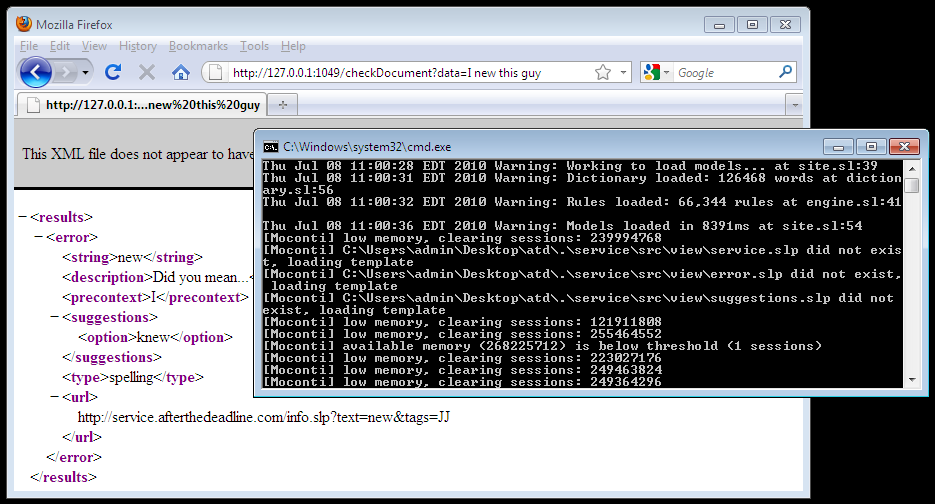
The smarts behind After the Deadline is our open source software service. This is the code that accepts text, checks it with cool AI algorithms, and spits out XML containing spelling errors, grammar errors, and suggestions. This code, with the TinyMCE and jQuery plugins, allows you to integrate After the Deadline checking into your web applications.
Today, I’ve posted an update to the software service package. Many of you have emailed me with questions about the AtD service, these updates should help you out. Here are the main changes:
- Added a low-memory mode to run AtD. Now you no longer need a super-computer to run AtD. The low-memory mode loads (and discards) parts of the language model as needed. The trade-off, it’s a little slower and probably won’t scale to hundreds of thousands of clients per day. The option to run AtD in full-bore production mode still exists. The quality of service is the same between the two modes.
- Parts of the AtD service were rewritten to allow AtD to run on Windows out of the box. I’ve also added a run-lowmem.bat file that starts the AtD service in low-memory mode on Windows.
- This update to the service supports the /checkGrammar API call that AtD for OpenOffice.org relies on. This call performs all checks except spelling. Why? Because the spelling corrector is the slowest part of AtD. By eliminating it, it’s possible to do as-you-type grammar checking for a lot of people.
- Of course this update has more grammar checks, an updated dictionary, and other enhancements that come from my maintenance of After the Deadline. You can view the commit to see the differences.
You can download the latest packages at http://open.afterthedeadline.com or do an svn update . if you checked the code out from http://openatd.svn.wordpress.org/atd-server.
Enjoy the update.
Let’s Make More Proofreaders Available in More Places
When After the Deadline started out, its greatest weakness was the lack of places one could use it. Originally it was available on PolishMyWriting.com, then WordPress and TinyMCE, and now many more applications. Making After the Deadline available in many places has allowed many of you to use it.
After the Deadline isn’t the only proofreading game in town though. Language Tool, An Gramadóir, and CoGROO are among many existing projects to make proofreading technologies available under an open source license. The challenge for these tools is they can’t be used in many places. The three I mentioned are available for OpenOffice.org and maybe a few other places.
Make Your Proofreading Technology Available in More Places
So, imagine that you want to make your proofreading technology available in more places, what would you do? One solution: implement the After the Deadline protocol.
After the Deadline is available for Firefox, Google Chrome, bbPress, WordPress, TinyMCE, jQuery, and even OpenOffice.org (beta). We have pretty solid extensions for each of these. Each of these extensions communicates with an After the Deadline server using a simple XML protocol.

If your proofreading technology spoke the After the Deadline protocol, then in theory, you could point one of our many extensions to your software and voilà, you’ll have a full user-experience for your technology.
Check Your Esperanto Grammar in Firefox
The developer of Esperantilo, a grammar checker for Esperanto, realized this and modified AtD/Firefox to talk to his program when it’s running. The result? Speakers of Esperanto now have an option to check their Esperanto writing from Firefox.
Here is a screenshot of it in action:

Yes, I like this…
Right now it’s easy to configure AtD for WordPress.org, bbPress, TinyMCE, jQuery, and OpenOffice.org to talk to another server. That’s a lot of ways for users to use your proofreading technology. Artur, the developer of Esperantilo, had to use an older (non-SSL) version of AtD/Firefox to point it to his software. If other proofreading packages choose to support the After the Deadline protocol and API, I’m happy to add an option to After the Deadline for Firefox and Google Chrome to support custom end-points.
If more developers implement the AtD protocol in their proofreading software, then users can benefit from using the best proofreading technology for their needs in many more applications.
OpenOffice.org Grammar Checkers
OpenOffice.org 3.2.1 was released a few weeks ago. To commemorate this, I’d like to write about the different proofreading tools available for this platform. It’s a common misconception that OpenOffice.org checks grammar out of the box. It doesn’t. OpenOffice.org does, however, have an API that lets developers add a grammar checker via an extension.
There are proofreading tools / grammar checkers for OpenOffice.org. A few that you may want to look at include:
Language Tool
Language Tool is a rule-based grammar checker with an impressive community developing rules for 18 languages. The inner-workings of this system were a heavy inspiration to AtD’s grammar checker implementation. We use Language Tool to check grammar for our French and German offerings of After the Deadline.
Readability Report
I saw Neil Newbold of the University of Surrey, the scientist developer of Readability Report, speak recently. I felt like I was listening to my proofreading brother from another mother. After the Deadline started life as a style checker hosted at PolishMyWriting.com. The AtD style checker uses best practices and suggestions from the Plain English movement to help you clean up your writing. Readability Report does the same thing for OpenOffice.org. It’s a style checker (rooted in Plain English) AND it’s a readability checker.
Some of the readability heuristics are incredible. Neil does some neat NLP work to decide which sentence is your simplest sentence and which sentences are your weirdest sentences. If you want to learn more about how these work, I recommend reading Neil’s paper The Linguistics of Readability: The Next Step for Word Processing that was presented at the NAACL Computational Linguistics and Writing Workshop in Los Angeles, CA.
Coming Soon: After the Deadline for OpenOffice.org
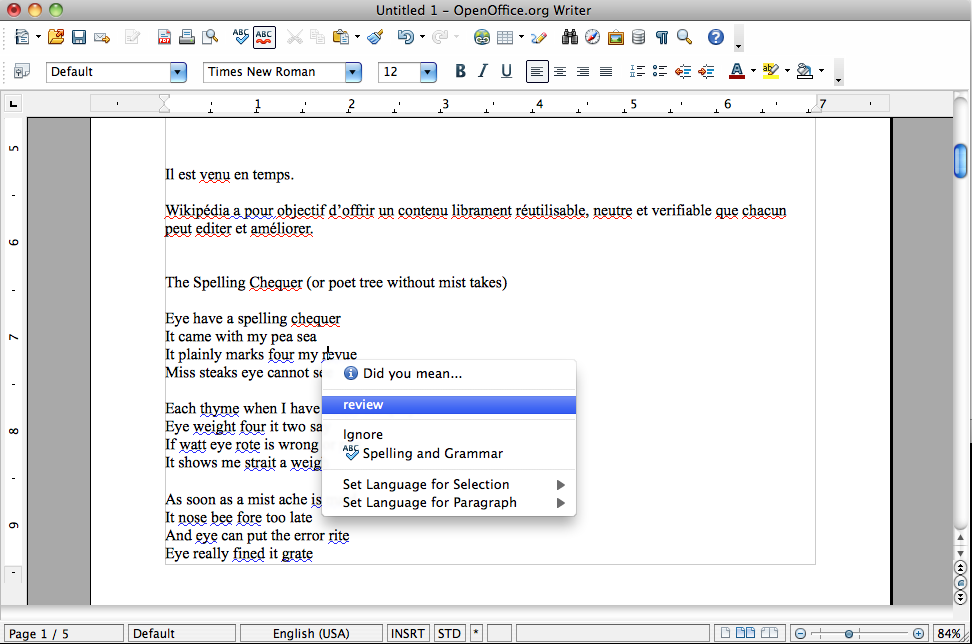
Since you’re here, I presume you know about After the Deadline. It’s a proofreading software service. After the Deadline uses statistical language models to offer smarter grammar and style recommendations. It also uses the same language models to detect over 1,500 misused words. If you write weather when you mean whether, After the Deadline can help you.
Recently, I started developing an After the Deadline extension for OpenOffice.org. I was so excited when I started this, I couldn’t stop until I had a beta ready for you to try (yes, you can download and install it now). It’s really cool to use After the Deadline in a word processor, like OpenOffice.org Writer.
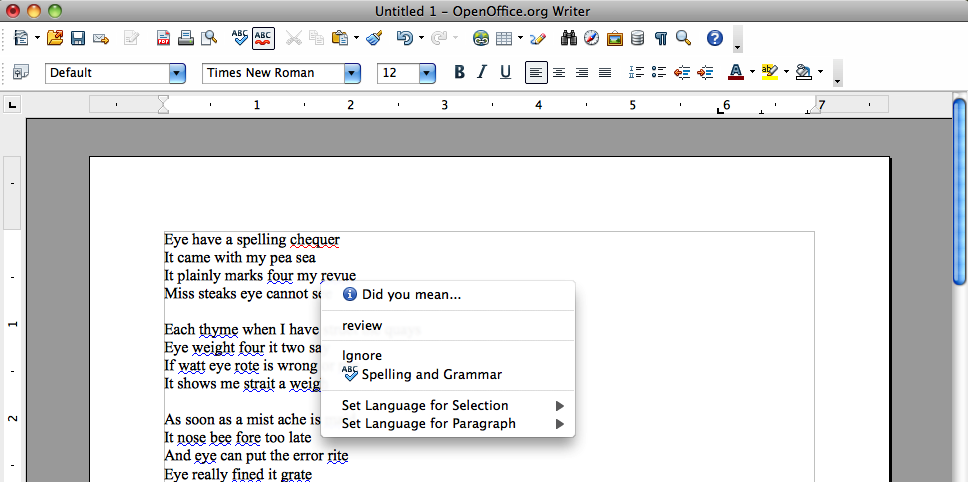
Because After the Deadline is a software service, this extension requires an internet connection to check your grammar, style, and misused words. If you’re not connected, it will silently do nothing. Rest assured, we’re not keeping your data and this extension communicates with our service over SSL.
The code is available in a public subversion repository and there is a category in the AtD ticket tracker for this OpenOffice.org extension.
The Design of a Proofreading Software Service
I spent Sunday at the Computational Linguistics and Writing Workshop on Writing Processes and Authoring Aids held at NAACL-HLT 2010. There I presented After the Deadline. After the Deadline is an open source proofreading software service. If you’re curious about how contextual grammar and spell checkers work, then you’ll want to read on. Here are the materials:
Presentation
Slides
Paper
More Depth
If you want more depth, I write about AtD quite often. Here are a few related blog posts that may interest you:
- AtD Source Code and Bootstrap Data – the server side heart of AtD is available under the GNU GPL
- Measuring the Misused Word Corrector – data / code to replicate the experiment used to measure AtD’s real-word error detection abilities
- How I Trie to Capture Mistakes – The paper glosses over the use of a Trie to generate a pool of suggestions. There just wasn’t enough space to explain it. This blog post covers it in detail.
One year of After the Deadline
Wow, I almost missed it. On 1 Jun 09, I launched After the Deadline. The first review of After the Deadline (AtD) came from w-shadow.com. There were also discussions on CMSReport.com and Hacker News.
Acquisition
It’s been an exciting year. On 21 Jul 09, I started with Automattic. Matt and I had worked out the deal several weeks earlier. We announced the acquisition of After the Deadline in Sept 09 and also made AtD available on WordPress.com.
I remember I was a little nervous about going live on WordPress.com. AtD is written in my language Sleep. I’ve used Sleep for a lot of things but not for the back-end of a web-scale project before. I was afraid of a memory leak or a freak concurrency issue. Fortunately, neither of these issues came up.
Open Source NLP R&D
Shortly after that, we open sourced the After the Deadline service. This is something that will take time to have its impact, but make no mistake, it’s significant.
Using statistics to provide better proofreading is nothing new. Researchers pursued the topic in the 90s and during the earlier part of the last decade. Production tools are starting to use statistical language models to provide smarter suggestions and even correct harder errors like misused homophones. Microsoft Word 2007 has a contextual spell checker that looks for misused words. Microsoft Research is developing ESL Assistant, a tool that uses a statistical language model to filter incorrect grammar suggestions. There are also new tools like Ginger and Ghotit that use statistical techniques to deliver smarter results for writers with learning disabilities. I believe cheap and powerful hardware, lots of available data, and persistent internet connectivity made these smarter, data driven, writing tools practical for production use. We’re riding the same wave of “now possible”.
I’m excited about After the Deadline’s place in this period of change. After the Deadline is simultaneously a production system and a research system. The code is available for researchers and students to tinker with and learn from. Let’s not forget, this also means that you can run your own AtD server and add AtD to your application.
Recently, this project produced its first academic paper. Sunday (6 Jun 10), I will present After the Deadline at the Workshop on Computational Linguistics and Writing taking place at the 2010 North American Association of Computational Linguistics Human Language Technologies Conference.
More Languages
After the Deadline went from one to five languages in the past year. We’ve released preliminary support for French, German, Portuguese, and Spanish. We offer contextual spell checking in these languages. We also use our language model to make the Language Tool grammar checker smarter. There is still much work to be done to bring our misused word detection to more languages.
Community Contributions
At WordCamp NYC, someone approached me with “I love After the Deadline but I always forget to run it”. He suggested we add a feature to automatically proofread posts on submit. No good idea should get lost, so I posted this to the ideas page. Later, I received an email from Mohammad Jangda, who offered to implement this feature. I first made his patch live on WordPress.com. Without an announcement, 500 people were enabling it each day. Over time, auto-proofread doubled the use of After the Deadline on WordPress.com. This same feature has made it into our other platforms as well.
Our wish is to see AtD help people write better in as many places as possible. We put a lot of effort into making high quality plugins, it’s nice when we get help. Gautam Gupta is a great example of such help. He created After the Deadline for bbPress. He and I release updates around the same time and he usually beats me to the punch. My favorite is when he announced AtD/bbPress with support for French, German, Portuguese, and Spanish before I had an updated WordPress plugin out the door.
More Places
As I mentioned in the last paragraph, After the Deadline is now available in a lot more places. We have stable plugins for jQuery and TinyMCE. The AtD Core library has allowed us to reuse the protocol parsing and error highlighting logic in many projects.

We now have After the Deadline for Firefox and Google Chrome. I’m amazed at how well these add-ons work. I didn’t believe they were possible. Mitcho Erlewine took on the initial challenge and worked with us to make After the Deadline for Firefox a reality.
We continue to experiment with other applications too. Who knows where you might see AtD next.
Lots of Proofreading
Last month, our AtD servers processed 3.5 million blog posts, emails, tweets, status updates, and who knows what else.
That’s a lot of proofreading. Not bad for a first year.
Can we use crowd sourcing to improve AtD?
I’ve written about learning from AtD use in the past. The main ideas I had back then were to bring more data into AtD’s corpus and analyze ignored phrases to find gaps in AtD’s dictionary. I put some time into these ideas but the initial results didn’t look too promising, so I backed off.
Recently, the operator of Online Rechtschreibprüfung 24/7 contacted me. His website offers German spell and grammar checking services (with a beta version using AtD). Neat stuff. Being the nice guy that he is, he is also giving back. His users have the option of marking a spelling mistake as false. He has collected this data and made it available to improve the German After the Deadline dictionary.
This got me to thinking. What could I do to PolishMyWriting.com to help you, help me, improve After the Deadline‘s English checking.
Here are some ideas:
- Add a “Not Misspelled?” menu item for spelling errors. This could collect a list of words that are candidates to be added to AtD’s dictionary, similar to what Online Rechtschreibprüfung 24/7 does.
- Add a “Not an error?” menu item for grammar and style errors. This could collect the error and the context around it.
- Add a “Better suggestion?” menu item for grammar, style, and misused word errors. Here you could input a better suggestion for an error.
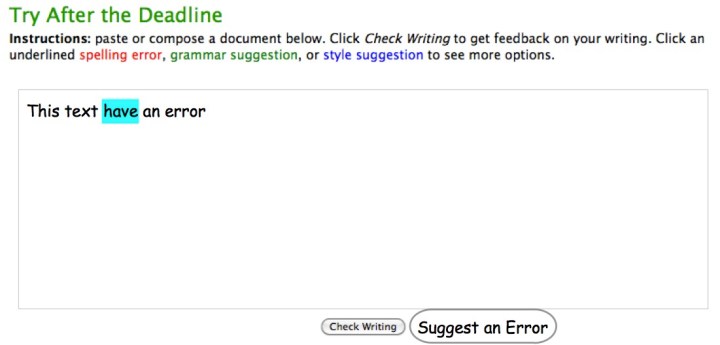
These three things are pretty trivial to do. I’d also like to find a way to let users highlight errors that aren’t caught. I don’t have any ideas for magically learning from these suggestions. Right now I’d have to analyze each of them and develop rules to catch these errors.
Maybe an option to highlight some text, click Suggest an Error, and complete a short survey about what type of error the text contains.
What are your thoughts?
A More Secure AtD Experience for the Browser
We’ve been hard at work and now AtD for Google Chrome 1.1 and AtD for Firefox 1.3 are now available. These updates feature an important addition for your security and privacy.
AtD started as a plugin for WordPress and everything it checked was going to be posted on a public blog anyways. Now that AtD is in the browser this has changed. To protect your information, both AtD/Chrome and AtD/Firefox now use SSL to communicate with the AtD service. This means your data is now encrypted when it’s sent to our service for proofreading.
If you’d like to know what else is new, you can read the change logs:
How to Update:
To update to the latest After the Deadline for Google Chrome, visit chrome://extensions and click Update Extensions Now. This will automatically download and install the update for you. No restart required.
To update to the latest After the Deadline for Firefox, visit Tools -> Add-ons and click Find Updates. This will download and install the update for you. Firefox will ask you to restart your browser.
Comments Off on A More Secure AtD Experience for the Browser
 After the Deadline
Comments Off on After the Deadline for Comments – So Many Ways, So Much Fun