How to Jump Through Hoops and Make a Chrome Extension
Last week, we released After the Deadline for Google Chrome. I like Chrome. It’s low on UI clutter and it’s very fast.
Chrome for the extension developer is a rapidly changing world. I wanted After the Deadline for Google Chrome to match our Firefox add-on feature for feature. I hit and overcame a few road blocks meeting this goal.
This blog post is highly technical and deals with some of the innards of writing Chrome extensions. If you’re not interested in this kind of stuff, then take note that I like Chrome, it’s not done yet, and this makes things hard at times. I’m working to bring the best possible proofreading experience to Google Chrome. You may stop reading now.
If you’re still here, that means you’re a developer. I hope this information helps you in your Chrome extension development adventure.
How to refer to internal images in CSS
Google Chrome, like Firefox, makes extension resources available via a special URL. In Firefox, you set the identifier for your extension and can reference images and other resources using this URL. In Google Chrome this URL depends on your extension’s ID. This extension ID changes depending on whether the extension is loaded as loose files or packaged. Because of this, you should not hard code the URL to an extension resource in your CSS file.
So how can one refer to internal images or other resources in a CSS file?
One option is to avoid referring to internal images or resources at all. You can set CSS properties using JavaScript and chrome.extension.getUrl(‘resource.ext’). This is kind of hacky and I didn’t want to set and unset hover listeners just to do something CSS already gives me for free.
Another option, discovered in this thread, is to convert your images to base64 and embed them as data URLs in your CSS file. It’s an extra step in the beginning but it solves the problem of referring to internal images.
div.afterthedeadline-button
{
background: url(data:image/png;base64,data goes here) transparent no-repeat top left !important;
Once this hack is in place, you won’t have to worry about extension IDs in your CSS files again.
Good luck with those IFRAMEs
Content scripts (Chrome JS extensions) run in a sandbox separate of the environment scripts attached to a page see. This is good as it reduces the possibility of extensions conflicting with web applications. Content scripts see the same DOM that user scripts see. It is possible to make changes to the DOM and inspect it. I recommend that you read the Chrome extension tutorial and watch Google’s video to understand content scripts.
Unfortunately, Google left a few toys out of the sandbox. It’s nearly impossible to work with an IFRAME. The contentWindow property of any IFRAME DOM element is null. Also window.frames is empty. This is a known bug.
Thankfully, the contentDocument.documentElement property does exist. Through this I can set and get the contents of an IFRAME. That’s close to what I want, but not exact. To proofread an editor, After the Deadline creates an editable DIV and copies style information from the editor to this new DIV. To make this convincing for IFRAMES, I have a need to access style information from the contentWindow property.
I tried to make a content script that figures out if it’s attached to an IFRAME. If it is, the script could communicate the needed information to the extension background script via Chrome’s message passing mechanism.
Unfortunately this didn’t work because Chrome only allows scripts to attach to URLs that have an http:// or https:// scheme. Dynamically generated IFRAMEs used by WYSIWYG editors usually have an empty source attribute which does not match an http:// or https:// scheme.
This thread suggests adding a SCRIPT tag to the DOM to execute a script outside the Chrome extension sandbox. However this isn’t necessarily a straight forward process either.
Execute a Script Outside the Chrome Sandbox
The Chrome extension sandbox exists to protect user scripts from extension scripts and vice versa. It would also be dangerous if a malicious user-land script could get into the Chrome sandbox and manipulate the Chrome extension APIs. For these reasons, it’s natural that Google Chrome would discourage extensions from running scripts outside the sandbox. I tried to insert a SCRIPT tag with a SRC attribute into the site’s DOM using jQuery. This didn’t work.
What did work was injecting inline JavaScript that constructs a SCRIPT tag with a SRC attribute from the site’s DOM. Here is the code:
jQuery('body').append('<script type="text/javascript">(function(l) {
   var res = document.createElement('SCRIPT');
   res.type = 'text/javascript';
   res.src = l;
   document.getElementsByTagName('head')[0].appendChild(res);
})('"+chrome.extension.getURL("scripts/inherit-style.js");</script>');
You’ll want to replace chrome.extension.getURL('scripts/inherit-style.js') with your resource. This is a convenient way to execute code outside of the extension sandbox.
Beware of WebKit Specific Styles
To make my proofreader look pretty, I inherit as many style properties as I can from the original editor. Mitcho showed me this great trick to copy the styles of one element to another:
var css = node.defaultView.getComputedStyle(node, null);
for (var i = 0; i < css.length; i++) {
    var property = css.item(i);
    /* note that I'm assuming jQuery here, proofreader is the note inheriting the property */
    proofreader.css(property, css.getPropertyValue(property));
}
This trick works fine in Chrome, except I found myself scratching my head when some DIVs were editable even though their contentEditable attribute was undefined. The opposite also held true, sometimes my DIV was not editable even though I defined the contentEditable attribute as true. I learned that WebKit has a CSS property -webkit-user-modify that trumps this attribute.
It’s unlikely you’ll ever encounter this, but one day, someone will do a google search, find this post, and I’ll have given them three hours of life they would have lost otherwise.
Final Thoughts
I like Chrome. It’s a good browser. The world of Chrome extensions is changing and expanding rapidly. On one hand, extensions can’t do simple stuff yet, like add items to the context menu. On the other hand, this is being worked on.
Now for the final hoop. There are three distributions of Google Chrome. These are the stable channel, beta channel, and the developer channel. I started out developing in the developer channel and later downgraded to the beta channel as I continued my development. This was a mistake. There are big differences between the stable channel and beta channels. For example, browser actions (toolbar buttons) are allowed to have popup menus. These popups work in the beta channel (5.x) but not in the stable channel (4.x).
Before you release, be aware of these differences. I recommend developing against the stable channel. If you rely on features from a new version, implement them and then verify that your extension degrades nicely on the old version of Chrome. That’s it.
If you’re willing to jump through some hoops you can make a great Chrome extension. I found the Chrome extension mailing list very helpful.
Thanks to Google and the Chromium community for developing a great browser. I’m ok with jumping through a few hoops.
After the Deadline for Google Chrome
The number one search term on this blog is “After the Deadline Chrome”. You’d think some people wanted to see After the Deadline on Google Chrome.
Chrome users, you know who you are, we have something special for you today. We’ve released After the Deadline for Google Chrome.
After the Deadline is a powerful proofreading technology, that’s also available for Firefox. If you haven’t used After the Deadline before, check out our demonstrations. Now you can feel safe when you push send, tweet without alerting the writing police, and get your status updates correct on Facebook.
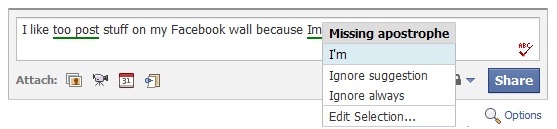
This extension is built to put you in control of the proofreading experience. You can disable AtD on certain sites, ignore phrases, enable more proofreading features, control auto-proofread, and set a keyboard shortcut.
Read the documentation to learn more or download it from the Google Chrome Extensions repository.
For the best user experience, we recommend the latest beta channel of Chrome. The browser is constantly evolving and we took advantage of new features to bring the AtD experience to Chrome.
Measuring the Real Word Error Corrector
Before we begin: Did you notice my fancy and SEO friendly post title? Linguists refer to misused words as real word errors. When I write about real word errors in this post, I’m really referring to the misused word detector in After the Deadline.
One of my favorite features in After the Deadline is the real word error corrector. In this post, I’ll talk about this feature and how it works. I will also present an evaluation of this tool compared to Microsoft Word 2007 for Windows which has a similar feature, one they call a contextual spelling checker.
Confusion Sets
After the Deadline has a list of 1,603 words it looks at. In this list, words are grouped into confusion sets. A confusion set is two or more words that may be misused during the act of writing. Some surprise me, for example I saw someone write portrait on Hacker News when they meant portray. The words portrait and portray are an example of a confusion set.
Confusion sets are a band-aid and a limitation but they have their place for now. In an ideal program, the software would look at any word you use and try to decide if you meant some other word using various criteria at its disposal. After the Deadline doesn’t do this because it would mean storing more information about every word and how it’s used than my humble server could handle. Because of memory (and CPU constraints), I limit the words I check based on these fixed confusion sets.
Finding Errors
To detect real word errors, After the Deadline scans your document looking for any words in that potentially misused word list. When AtD encounters one of these words, it looks at the word’s confusion set and checks if any other word is a better fit.
How does this happen? It’s pretty simple. AtD looks two words to the left and two words to the right of the potentially misused word and tries to decide which of the words from the confusion set are the best fit. This looks like:
I’ll admit, the site does portrait credibility.
Here, After the Deadline uses the following statistical features to decide which word W (portrait or portray) you want:
P(W | site, does)
P(W | credibility, END)
P(W | does)
P(W | credibility)
P(W)
The probability of a word given the previous two words is calculated using a trigram. When After the Deadline learns a language, it stores every sequence of two words it finds and sequences of three words that begin or end with a confusion set. To calculate the probability of a word given the next two words requires trigrams and a little algebra using Bayes’ Theorem. I wrote a post on language models earlier. To bring all this together, After the Deadline uses a neural network to combine these statistical features into one score between 0.0 and 1.0. The word with the highest score, wins. To bias against false positives, the current word is multiplied by 10 to make sure it wins in ambiguous cases.
Let’s Measure It
Ok, so the natural question is, how well does this work? Every time I rebuild After the Deadline, I run a series of tests that check the neural network scoring function and tell me how often it’s correct and how often it’s wrong. This kind of evaluation serves as a good unit test but it’s hard to approximate real word world performance from it.
Fortunately, Dr. Jennifer Pedler’s PhD thesis has us covered. In her thesis she developed and evaluated techniques for detecting real word errors to help writers with dyslexia. Part of her research consisted of collecting writing samples from writer’s with dyslexia and annotating the errors along with the expected corrections. I took a look at her data and found that 97.8% of the 835 errors are real word errors. Perfect for an evaluation of a real word error corrector.
Many things we consider the realm of the grammar checker are actually real word errors. Errors that involve the wrong verb tense (e.g., built and build), indefinite articles (a and an), and wrong determiners (the, their, etc.) are real word errors. You may ask, can real word error detection be applied to grammar checking? Yes, others are working on it. It makes sense to test how well After the Deadline as a complete system (grammar checker, misused word detector, etc.) performs correcting these errors.
To test After the Deadline, I wrote a Sleep script to compare a corrected version of Dr. Pedler’s error corpus to the original corpus with errors. The software measures how many errors were found and changed to something (the recall) and how often these changes were correct (the precision). This test does not measure the number of elements outside the annotated errors that were changed correctly or incorrectly.
To run it:
grep -v ‘\-\-\-\-‘ corrected.txt >corrected.clean.txt
java -jar sleep.jar measure.sl corrected.clean.txt
Now we can compare one writing system to another using Dr. Pedler’s data. All we need to do is paste the error corpus into a system, accept every suggestion, and run the measure script against it. To generate the error file, I wrote another script that reads in Dr. Pedler’s data and removes the annotations:
java -jar sleep.jar errors.sl > errors.txt
Now we’re ready. Here are the numbers comparing After the Deadline to Microsoft Word 2007 on Windows, Microsoft Word 2008 on the Mac, and Apple’s Grammar and Spell checker built into MacOS X 10.6. I include Microsoft Word 2008 and the Apple software because neither of these have a contextual spell checker. They still correct some real word errors with grammar checking technology.
| System | Precision | Recall |
|---|---|---|
| MS Word 2007 – Windows | 90.0% | 40.8% |
| After the Deadline | 89.4% | 27.1% |
| MS Word 2008 – MacOS X | 79.7% | 17.7% |
| MacOS X Spell and Grammar Checker | 88.5% | 9.3% |
As you can see, Microsoft Word 2007 on Windows performs well in the recall department. Every error in the dyslexic corpus that is not in After the Deadline’s confusion sets is an automatic hit against recall. Still, the precision for both systems are similar.
You can try this experiment yourself. The code and data are available. I also created a page where you can paste in a document and accept all suggestions with one click.
Another Evaluation
Another evaluation of MS Word 2007’s real-word error detection was published by Graeme Hirst, University of Toronto in 2008. He found that MS Word has lower recall on errors. To evaluate MS Word, he randomly inserted (1:200 words) real-word errors into the Wall Street Journal corpus, and then measured the system performance. It would be a benefit to the research community (especially *cough*those of us outside of universities*cough*) if such tests were conducted on data that one could redistribute.
Final Thoughts
After running this experiment, I added the syntactically distinct words from Dr. Pedler’s confusion sets to AtD’s existing confusion sets, pushed the magical button to rebuild models, and reran these tests. I saw AtD’s recall rise to 33.9% with a precision of 86.6%. Expanding the confusion sets used in AtD will improve AtD’s real-word error correction performance.
I’ll continue to work on expanding the number of confusion sets in After the Deadline. One challenge to whole-sale importing several words is that some words create more false positives than others when checked using the method described here (hence the precision drop when adding several unevaluated new words to the misused word detector).
If you’re using Microsoft Word 2007 on Windows, you’re in good hands. Still, After the Deadline is comparable in the real-word error detection department when MS Word 2007 isn’t available.
If you’re using a Mac, you should use After the Deadline.
Two Resources on Innovation
I’m a firm believer that the opportunity for innovation happens when suddenly the right pieces become available and someone puts them together.
If you consider AtD innovative, know that I didn’t invent anything crazy and new with After the Deadline. I applied simple algorithms to a lot of data and achieved good results. The availability of data, cheap CPU power, and a cultural readiness to accept a software feature that depends on a remote server made After the Deadline possible. I simply put the pieces together (and spent some sweat trying lots of simple algorithm/data combinations that didn’t work) and voilà, a proofreading system.
I’d like to share with you two resources that helped me appreciate the innovation process.
The first is the Myths of Innovation by Scott Berkun. Scott talked to the Automattic crew during our October meetup and I really enjoyed the time we had with him. I read his book and found the historical examples relevant. It’s easy for us to think that innovation happens in a vacuüm with one lone hero pulling it all together at the magic moment. Innovation is a lot of iteration and only becomes a magical moment when enough iteration has happened that others notice.
The other resource is the Connections documentary series by James Burke. I’m on my third time watching. It’s an amazing journey through history. The series is from the 70s and has a lot of speculation about the future and where technology may take us. James Burke speculates about the threat computers present to privacy and how technology might connect us in a way that folks couldn’t even imagine then. The series discusses history in terms of problems and the inventions they led to that later led to other problems and inventions. For example, the Faith in Numbers episode charts a historical journey from the Jacquard Loom, to the United States census, and finally to computers programmed with punch cards.
The message in Scott’s book and Burke’s series are the same. If you look at them, you won’t think about innovation the same way again.
Comments Off on Two Resources on Innovation
A Guide to the AtD Project(s)
I was cleaning up tickets on the AtD TRAC today and noticed a lot of sub-projects. If I were new, I’d be a little confused. I’m writing this post to clarify what projects exist under the AtD umbrella and how they fit together. I’ll end this post with resources related to these projects and let you know how you can get involved.
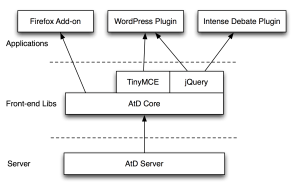
This diagram shows some of the projects and how they relate:
 The Server Side
The heart of AtD is the server software. This is where the proofreading happens. The software is written in a mix of Sleep and Java. Applications are welcome to communicate with it through an XML protocol. It’s released under the GNU General Public License. There is a treasure trove of natural language processing [1, 2, 3, 4] code here.
Front-End Plugins
Of course a server is no good without a client. After writing a plugin for TinyMCE and later jQuery, I noticed duplicate functionality. To ease my burden fixing bugs in both and make it easier to port AtD to other applications, the AtD core library was born. This library has functions to parse the AtD XML protocol into a data structure that it uses to highlight errors in a DOM. It’s also capable of resolving the correct suggestions for an error (given its context). This library is the foundation of AtD’s front-end. One change to it immediately benefits the WordPress plugin, the Firefox add-on, the TinyMCE plugin, and the jQuery plugin. This is why you will often see me announce multiple things at once.
TinyMCE is a WYSIWYG editor used in many applications including WordPress. It was the first editor I supported with After the Deadline. This plugin makes it possible to add AtD to any application that already has TinyMCE installed. Some things like persisting settings for “Ignore Always” are left to the developer. For the most part though, this is a complete package.
jQuery is a JavaScript library that makes life easier in so many ways. Our jQuery plugin makes it easy to add After the Deadline functionality to any DIV (and TEXTAREA). I first wrote this to offer After the Deadline as a plugin for the IntenseDebate comment system.
Missing from this diagram is the CKEditor plugin. I made an After the Deadline CKEditor plugin in 8 hours to prove the utility of the AtD Core library. It’s missing some of the polished functionality that the TinyMCE and jQuery plugins have. As none of our projects use CKEditor I haven’t had a need to update it. It’s looking for a maintainer.
These building blocks are released under the GNU LGPL license.
Applications
The pieces I’ve written about so far are merely building blocks. They’re useless unless they’re applied somewhere. The WordPress plugin is built on the TinyMCE and jQuery plugins. Through these plugins I’m able to offer AtD support in both the visual and HTML editor. Thanks to AtD core, I’m able to make sure both editors (mis)behave in the same way.
The Firefox add-on was the first Automattic project to use the AtD core library directly. With it, Mitcho was able to talk to start highlighting errors as soon as he got the add-on talking to the AtD server. This was pretty exciting as it meant we had a lot of functionality right away.
The building blocks are nice as they also make it possible for others to contribute plugins for other applications. For example, Gautam maintains a bbPress plugin using these building blocks.
And of course having these building blocks also means you’re able to add After the Deadline to your application.
Project Resources
And finally, there are the project resources. As much as it seems like things are scattered around, it’s not really that bad.
We use a single TRAC instance for all AtD projects maintained by Automattic. You can report any issues there directly, you just need a WordPress.org account to login.
Most of the AtD code maintained by Automattic is maintained in a common subversion repository as well.
This is the official After the Deadline blog for all the AtD projects maintained by Automattic.
Anything related to the front-end is hosted on the AtD developer’s page.
Information about the NLP research and the proofreading software service are kept at: http://open.afterthedeadline.com
It’s not very active, but there is a mailing list on Google Groups for all AtD related projects.
And we’re using GlotPress to make it easy to translate the AtD projects to other languages.
Getting Involved
That’s it, don’t forget to read our getting involved guide. One of the easiest ways to contribute is to file bugs in TRAC or contribute translations.
If you develop an After the Deadline plugin for an application, let me know. I’ll gladly link to it.
Hopefully this post helps lay out the landscape of the AtD project and some of the sub-projects involved with it.
Comments Off on A Guide to the AtD Project(s)
AtD Updates (Lots of them)
I have a bag of goodies for you today.
WordPress Plugin
Thanks to the help of wonderful volunteers, our WordPress plugin has been updated with translations for German, Spanish, Italian, Japanese, Polish, and Russian. It also includes updated translations for Portuguese and French.
This update also fixes several bugs related to finding and highlighting errors. I recommend this update for all AtD users.
You can get the latest from the WordPress plugin repository.
Firefox Add-on
If you use After the Deadline for Firefox, the 1.2 release is available on the early access page. The early access release exists because it takes time for the volunteer editors to review the release. An approval is necessary for it to show up as an automatic update.
I like to think of it as a free code review from an experienced developer, just for participating in the Mozilla community. You can wait for the automatic update or get the early access release now. Don’t you want to be the first on your block to run the latest AtD for Firefox?
This release fixes several bugs and improves the appearance of proofreading mode in WYSIWYG editors. Take a look at the screenshots of Google Docs and Zoho Writer. Beautiful.
bbPress
Gaut.am just released AtD/bbPress 1.6. I think he knows more about my release schedule than I do. We’re always releasing updates at the same time.
The latest bbPress plugin adds an auto-proofread option, the ability to select which errors you see, and an ignore always option.
Development Libraries
If you’re a developer using AtD, don’t worry–I haven’t left you out. Our TinyMCE plugin is up to date with the latest bug fixes. Also if you’re using the jQuery plugin, the cross-domain AJAX calls now support all the languages AtD supports.
The AtD core library (the foundation of AtD’s front-end) has several bug fixes as well.
Also, I don’t think I announced this yet, but last month M. Sepcot released an AtD API for Ruby.
You can always find the latest AtD libraries on our Developer Resources page.
Comments Off on AtD Updates (Lots of them)
Humble Origins: PolishMyWriting.com
I found an old screenshot today and thought I’d share it to give you an idea of (1) how bad my design eye is and (2) some history of After the Deadline. After the Deadline started life as a web-based style checker hosted at PolishMyWriting.com. My goal? Convince people to paste in their documents to receive feedback on the fly, while I made tons of money from ad revenue. It seemed like a good idea at the time.
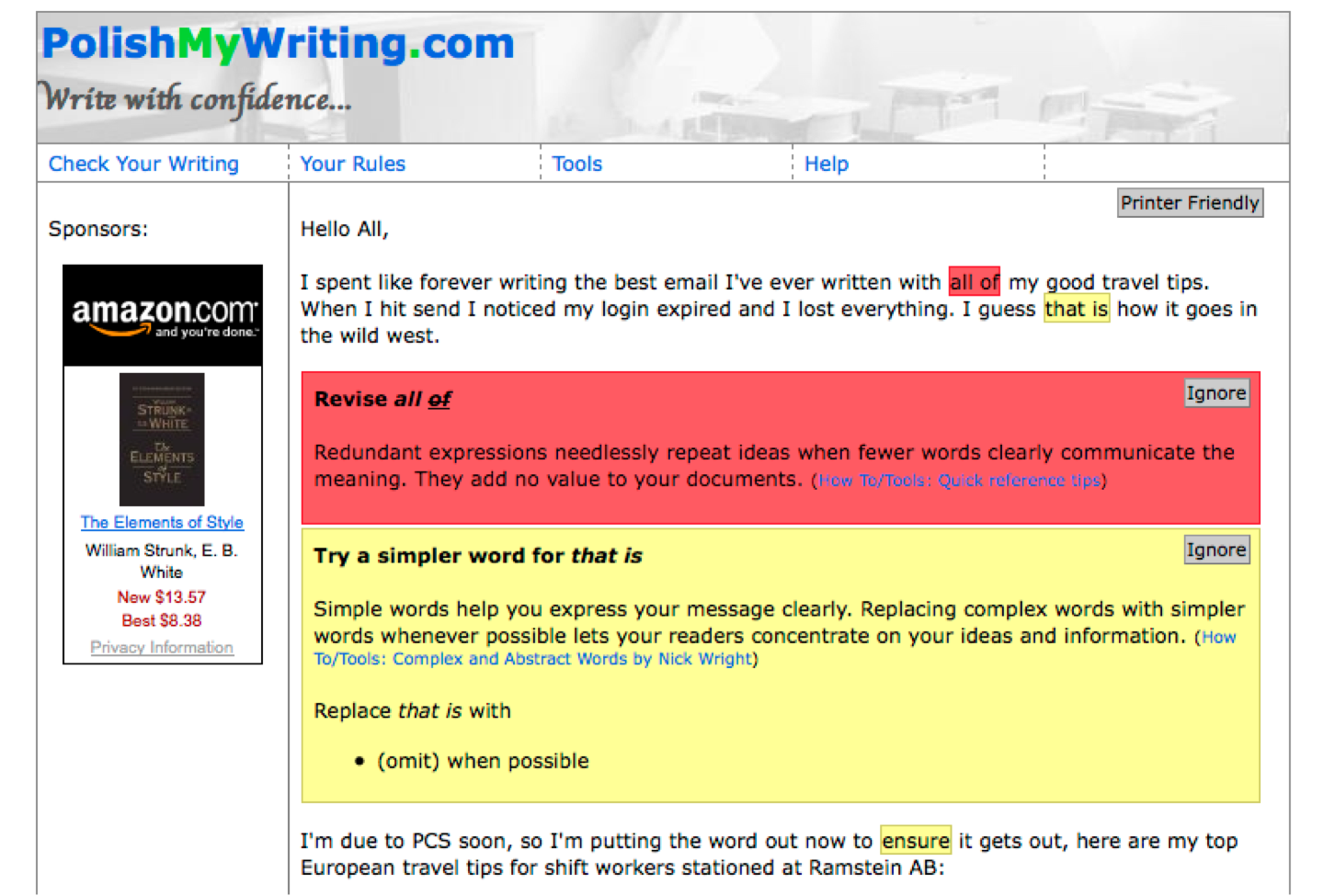
The Original PolishMyWriting.com
PolishMyWriting.com did not check spelling, misused words, or grammar. It relied on 2,283 rules to look for phrases to avoid, jargon terms, biased phrases, clichés, complex phrases, foreign words, and redundant phrases. The most sophisticated natural language processing in the system detected passive voice and hidden verbs.I wouldn’t call it sophisticated though. I referenced a chart and wrote simple heuristics to capture the different forms of passive voice. Funny, it’s the same passive voice detector used in After the Deadline today.
This rule-based system presents all of its suggestions (with no filtering or reordering) to the end-user. A hacker news user agreed with 50% of what it had to say and that’s not too bad. After the Deadline today looks at the context of any phrase it flags and tries to decide whether a suggestion is appropriate or not. A recent reviewer of After the Deadline says he agrees with 75% of what it says. An improvement!
How PolishMyWriting.com Worked
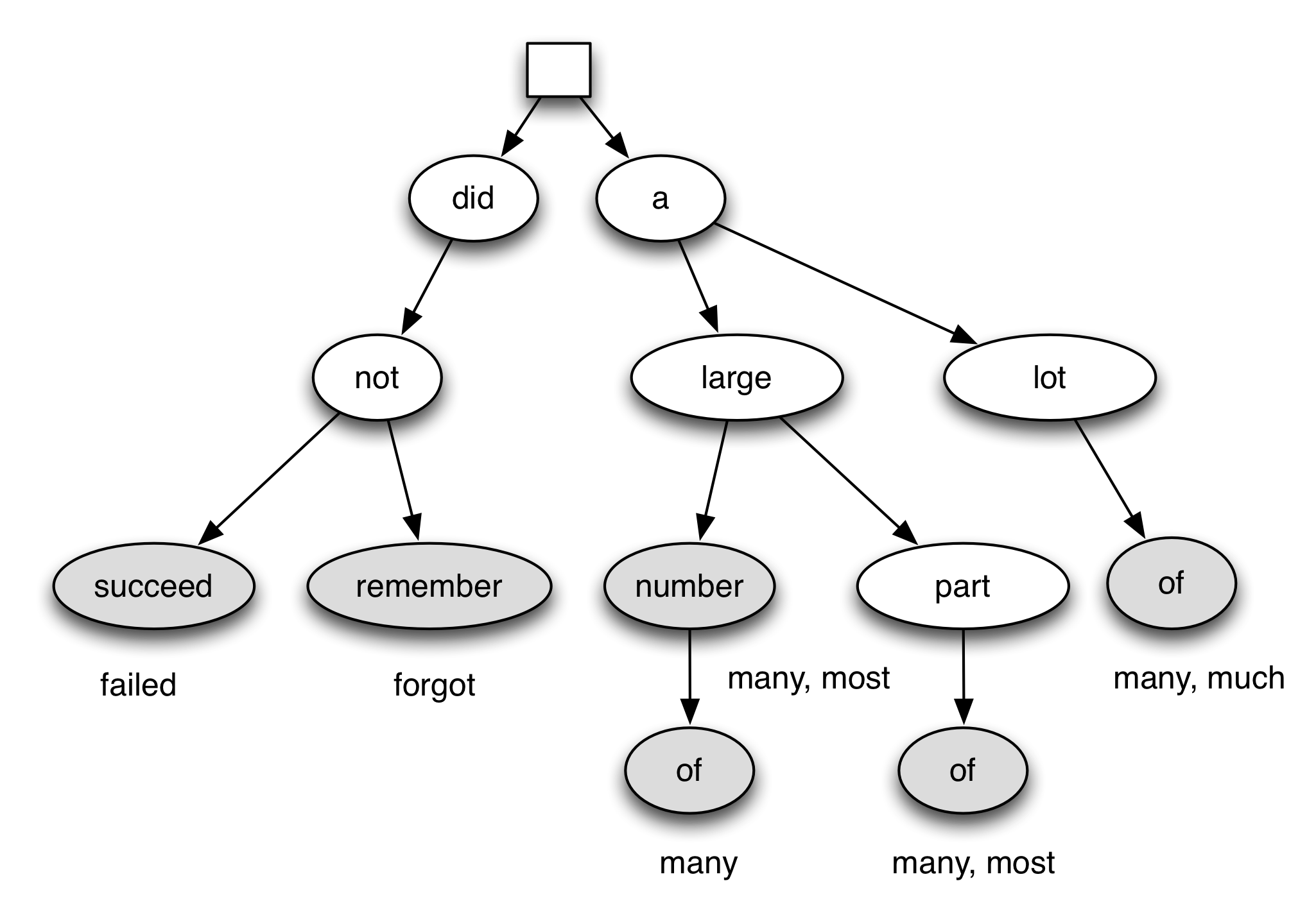
My favorite part of PolishMyWriting.com was how it stored rules. All the rules were collapsed into a tree. From each word position in the document, the system would the tree looking for the deepest match. In this way PolishMyWriting.com only had to evaluate rules that were relevant to a given position in the text. It was also easy for the match to fail right away (hey, the current word doesn’t match any of the possible starting words for a rule). With this I was able to create as many rules as I liked without impacting the performance of the system. The rule-tree in After the Deadline today has 33,331 end-states. Not too bad.
PolishMyWriting.com Rule Tree
The rule-tree above matches six rules. If I were to give it a sentence: I did not remember to write a lot of posts. The system would start with I and realize there is nowhere to go. The next word is did. It would look at did and check if any children from did in the tree match the word after did in the sentence. In this case not matches. The system repeats this process from not. The next word that matches is succeed. Here PolishMyWriting.com would present the suggestions for did not succeed to the user. If the search would have failed to turn up an end state for did not succeed, the system would advance to not and repeat the process from the beginning. Since it found a match, the process would start again from to write a lot of posts. The result I [forgot] to write [many, much] blog posts.
What happened to PolishMyWriting.com?
I eventually dumped the PolishMyWriting.com name. Mainly because I kept hearing jokes from people online (and in person) about how great it was that I developed a writing resource for the Polish people. It stills exists, mainly as a place to demonstrate After the Deadline.
And don’t forget, if PolishMyWriting.com helps you out.. you can link to it using our nifty banner graphic. 😉
Rethink Your Relationship with Your Spell Checker
Last week, switched.com reviewed several grammar checkers to celebrate National Grammar Day. The tested text was interesting to me and it inspired this post.
Its common for users to rely entirely on the in built proofreading capabilities of a word processor. Since the technology became standard in Microsofts Word in the 90’s countless cubicle dwellers and students have stopped carefully proofreading they’re own writing they have instead trust the automated spellcheck and grammar correcting features of their office product of choice to identify errors. We have carefully crafted this text to test the accuracy of these features, there are roughly 10 common grammatical mistakes in this paragraph. No matter good these tools perform there no replacement for carefully rereading you’re writing.
I agree and I think it’s time people rethink their relationship with their spell checker.
My friend Karen once told me a story about giving her husband feedback on a school paper. She noticed that he really liked semicolons. She confronted him on this and he said that Microsoft Word kept suggesting them and he kept accepting them. This is not a good situation.
Many writers rely on their spell checker to a fault. They see their spell checker as a tool to verify that a document is correct and ready to go with no effort on their part. If you want to verify that a document is correct, you need to reread it and look for errors. A great technique is to read the document backwards. Purdue’s Online Writing Lab has more tips like this.
If writers need to reread their documents, then what is the use of tools like After the Deadline? I look at After the Deadline as a tool that teaches users about writing. When asked what I do, I sometimes reply that I’m an English teacher with many thousands of students. No one gets the joke. It’s ok.
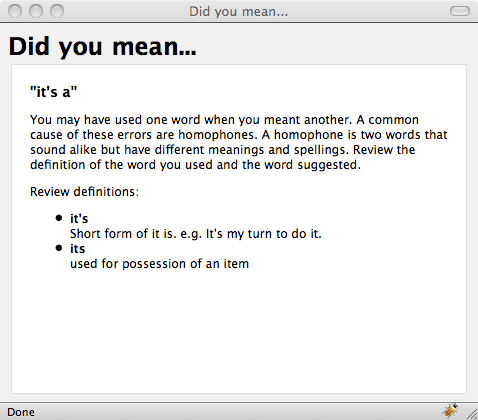
After the Deadline does a good job of finding its/it’s errors. It does not find all of them. I think this is OK. If a user checks their document and has a habit of misusing its/it’s, they’ll probably see a lot of errors. If this user is inquisitive, they may quick click explain. By doing this they’ll learn why the error is an error. By reading the feedback during the writing process, the lesson has the most potential to sink in.
Feedback is most valuable when it’s immediate. After the Deadline makes you a better writer through immediate feedback.
All About Language Models
One of the challenges with most natural language processing tasks is getting data and collapsing it into a usable model. Prepping a large data set is hard enough. Once you’ve prepped it, you have to put it into a language model. My old NLP lab (consisting of two computers I paid $100 for from Cornell University), it took 18 hours to build my language models. You probably have better hardware than I did.
Save the Pain
I want to save you some pain and trouble if I can. That’s why I’m writing today’s blog post. Did you know After the Deadline has prebuilt bigram language models for English, German, Spanish, French, Italian, Polish, Indonesian, Russian, Dutch, and Portuguese? That’s 10 languages!
Also, did you know that the After the Deadline language model is a simple serialized Java object. In fact, the only dependency to use it is one Java class. Now that I’ve got you excited, let’s ask… what can you do with a language model?
Language Model API
A bigram language model has the count of every sequence of two words seen in a collection of text. From this information you can calculate all kinds of interesting things.
As an administrative note, I will use the Sleep programming language for these examples. This code is trivial to port to Java but I’m on an airplane and too lazy to whip out the compiler.
Let’s load up the Sleep interactive interpreter and load the English language model. You may assume all these commands are executed from the top-level directory of the After the Deadline source code distribution.
$ java -Xmx1536M -jar lib/sleep.jar
>> Welcome to the Sleep scripting language
> interact
>> Welcome to interactive mode.
Type your code and then '.' on a line by itself to execute the code.
Type Ctrl+D or 'done' on a line by itself to leave interactive mode.
import * from: lib/spellutils.jar;
$handle = openf('models/model.bin');
$model = readObject($handle);
closef($handle);
println("Loaded $model");
.
Loaded org.dashnine.preditor.LanguageModel@5cc145f9
done
And there you have it. A language model ready for your use. I’ll walk you through each API method.
Count Words
The count method returns the number of times the specified word was seen.
Examples:
> x [$model count: "hello"]
153
> x [$model count: "world"]
26355
> x [$model count: "the"]
3046771
Word Probability
The Pword method returns the probability of a word. The Java way to call this is model.Pword(“word”).
> x [$model Pword: "the"]
0.061422322118108906
> x [$model Pword: "Automattic"]
8.063923690767558E-7
> x [$model Pword: "fjsljnfnsk"]
0.0
Word Probability with Context
That’s the simple stuff. The fun part of the language model comes in when you can look at context. Imagine the sentence: “I want to bee an actor”. With the language model we can compare the fit of the word bee with the fit of the word be given the context. The contextual probability functions let you do that.
Pbigram1(“previous”, “word”)
This method calculates P(word|previous) or the probability of the specified word given the previous word. This is the most straight forward application of our bigram language model. After all, we have every count of “previous word” that was seen in the corpus we trained with. We simply divide this by the count of previous to arrive at an answer. Here we use our contextual probability to look at be vs. bee.
> x [$model Pbigram1: "to", "bee"]
1.8397294594205855E-5
> x [$model Pbigram1: "to", "be"]
0.06296975819264979
Pbigram2(“word”, “next”)
This method calculates P(word|next) or the probability of the specified word given the next word. How does it do it? It’s a simple application of Bayes Theorem. Bayes Theorem lets us flip the conditional in a probability. It’s calculated as: P(word|next) = P(next|word) * P(word) / P(next). Here we use it to further investigate the probability of be vs. bee:
> x [$model Pbigram2: "bee", "an"]
0.0
> x [$model Pbigram2: "be", "an"]
0.014840446919206074
If you were a computer, which word would you assume the writer meant?
A Little Trick
These methods will also accept a sequence of two words in the parameter that you’re calculating the probability of. I use this trick to segment a misspelled word with a space between each pair of letters and compare the results to the other spelling suggestions.
> x [$model Pword: "New York"]
3.3241509434266565E-4
> x [$model Pword: "a lot"]
2.1988303923800437E-4
> x [$model Pbigram1: "it", "a lot"]
8.972553689218159E-5
> x [$model Pbigram2: "a lot", '0END.0']
6.511467636360339E-7
You’ll notice 0END.0. This is a special word. It represents the end of a sentence. 0BEGIN.0 represents the beginning of a sentence. The only punctuation tracked by these models is the ','. You can refer to it directly.
Harvest a Dictionary
One of my uses for the language model is to dump a spell checker dictionary. I do this by harvesting all words that occur two or more times. When I add enough data, I’ll raise this number to get a higher quality dictionary. To harvest a dictionary:
> x [$model harvest: 1000000]
[a, of, to, and, the, 0END.0, 0BEGIN.0]
This command harvests all words that occur a million or more times. As you can see, there aren’t too many. The language model I have now was derived 75 million words of text.
The Next Step
That’s the After the Deadline language model in a nutshell. There is also a method to get the probability of a word given the two words that came before it. This is done using trigrams. I didn’t write about it here because AtD stores trigrams for words tracked by the misused word detector only.
That said, there’s a lot of fun you can have with this kind of data.
Download the After the Deadline open source distribution. You’ll find the English language model at models/model.bin. You can also get spellutils.jar from the lib directory.
If you want to experiment with bigrams in other languages, the After the Deadline language pack has the trained language models for nine other languages.
The English language model was trained from many sources including Project Gutenberg and Wikipedia. The other language models were trained from their respective Wikipedia dumps.
Good luck and have fun.
After the Deadline is an open source grammar, style, and spell checker. Unlike other tools, it uses context to make smart suggestions for errors. Plugins are available for Firefox, WordPress, and others.
AtD Firefox 1.1 Released – Write Right in More Places
After the Deadline for Firefox 1.1 is now live on addons.mozilla.org. After the Deadline for Firefox lets you check your spelling, style, and grammar where ever you are on the web.
This release of After the Deadline for Firefox works in more places. Here is a screenshot of After the Deadline working with Google Docs:

This release also:
- Adds proofreading for French, German, Portuguese, and Spanish
- Fixes several bugs and reported add-on conflicts
You can read the full list of changes at http://firefox.afterthedeadline.com/upgrades/1.1/


2 comments